





 Upcoming Events
 Event Series
 On-Demand Events


The 9 Best Video Hosting Sites for 2026

Table of Contents
Maximize Your Marketing ROI
Join 10,000 other marketers already getting the best tips on running engaging events that boost pipeline and create raving fans.
For GTM teams, choosing the right video hosting service is a revenue decision. Your platform should deliver high-quality playback, look on-brand, and integrate directly with your CRM and MAP so you can tie viewer engagement to pipeline.
The best video hosting platforms give you in-depth video analytics, lead generation tools, and account-level insights—so you know who watched and what it meant for deals.
Pick wrong and you're stuck with videos that crash during demos, engagement data trapped in silos, and "branded" experiences that look like generic YouTube videos with basic embed code.
Best video hosting sites 2026
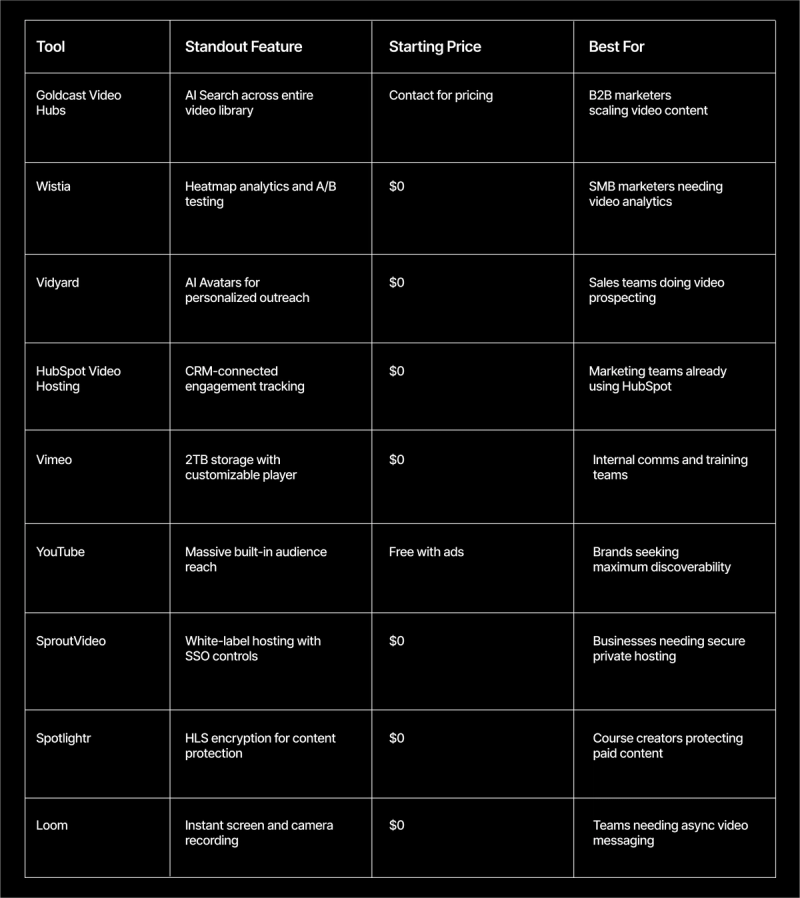
- Best for B2B video content at scale: Goldcast Video Hubs
- Best for SMB video analytics: Wistia
- Best for sales teams doing video prospecting: Vidyard
- Best for HubSpot users: HubSpot Video Hosting
- Best for internal communications: Vimeo
- Best for maximum reach: YouTube
- Best for secure private hosting: SproutVideo
- Best for course creators: Spotlightr
- Best for async messaging: Loom
The best video hosting sitesat a glance
Connect video views to pipeline with CRM-ready, account-level analytics. See exactly which prospects are warming up before your competitors do.
9 of the best video hosting platforms for B2B teams
Most video hosting sites give you vanity metrics like view counts.
The platforms that actually move the needle give you individual viewer behavior, watch-through analytics, and seamless integrations that turn online video engagement into sales intelligence you can act on.
Our advice? Pick based on motion: reach (YouTube) vs. demand capture, account intel, and revenue impact (CRM-connected platforms).
For a little help along the way, we reviewed vendor sites and third‑party reviews to help you choose. All pricing and information reflects publicly available data at time of writing.
1. Best for B2B video content at scale: Goldcast Video Hubs
Goldcast is an AI-powered B2B video content platform for webinars, events, repurposing, and on‑demand video—with seamless integrations to your CRM for complete video marketing workflows.
- Best for: B2B marketing teams scaling webinars, events, and video content
- Pricing: Contact for pricing
- Free trial: Yes, Content Lab offers a free trial
➡️ View plans
Key features
- AI Search: Query your entire video library using keywords, topics, or speaker names
- Branded hubs: Create Netflix-style content destinations with your branding and navigation
- CRM integration: Bi-directional sync with Salesforce, HubSpot, and Marketo for account-level analytics
- Lead capture: Progressive profiling and gating options throughout the viewing experience
- SEO optimization: Video pages include full transcripts and chapter markers for search visibility
Pros
- Customizable player creates premium branded experiences
- Account-level video analytics track individual viewer behavior and sync to CRM
- Real-time sales alerts when target accounts engage with content
Cons
- Platform designed for B2B marketing use cases (not broad entertainment experiences)
- Analytics setup requires clear CRM data structure
- Advanced features require custom pricing
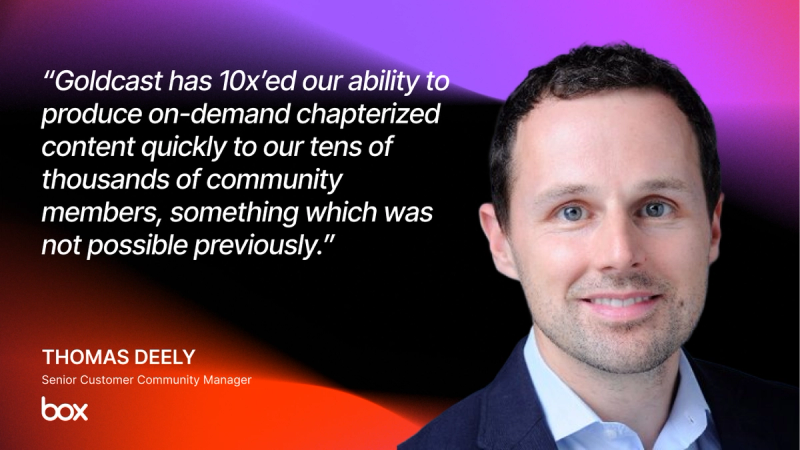
Join LG, Uber, ClickUp, and more. Turn every video view into sales intelligence with Goldcast. See how Video Hubs transforms content into revenue.
2. Best for SMB video analytics: Wistia
Wistia gets that smaller marketing teams need to actually understand viewer engagement. Their heatmap video analytics show exactly where people drop off, rewind, or re-watch your video files—no guesswork required. Free hosting gets you 10 videos and 200 GB bandwidth. Paid pricing unlocks A/B testing, customization, and ad-free white-label options.
- Best for: SMB marketers who need detailed video engagement analytics
- Pricing: $0/month (Free tier); paid plans available
- Free trial: Yes, free trial for Pro and Advanced plans from $79 per month
➡️ View plans
Key features
- Heatmap video analytics: See exactly where viewers drop off or rewatch content
- A/B testing: Test thumbnail images, CTAs, and video lengths for better conversion
- Turnstile lead generation: Gate videos at any moment without external redirects
- Branded channels: Create video galleries with customizable player options
Pros
- Non-technical teams can upload videos and manage video content easily
- Heatmaps deliver actionable insights to optimize viewer engagement
- Email capture connects views directly to lead generation
Cons
- Basic video editing capabilities compared to dedicated software
- Pricing scales with library size, becoming expensive at volume
- Advanced analytics features locked behind higher-tier plans
3. Best for sales teams doing video prospecting: Vidyard
Vidyard built their solution for GTM teams who need personalized video marketing that cuts through inbox noise. The platform's AI Avatars and Video Agent features automate personalized video creation, enabling reps to scale outreach without manually recording each video.
- Best for: Sales teams creating personalized video outreach at scale
- Pricing: $0 (Free tier); paid plans available
- Free trial: Yes, 14 days for the Starter plan
➡️ View plans
Key features
- AI Avatars: Generate personalized videos without screen recording
- Chrome extension: Record and share directly from Gmail or social media
- Video analytics: Track who watched, for how long, and when they stopped
- Video Agent: AI-powered automation creates personalized videos from prospect data
Pros
- Custom thumbnails with prospect names boost email open rates
- AI features scale personalized outreach without piling on additional recording time
- Granular viewer analytics show who watched and for how long
Cons
- Some users report that the most valuable features require paid plans
- Limited editing capabilities unless you upgrade to higher tiers
- Videos sometimes blocked by enterprise IT firewalls
4. Best for HubSpot users: HubSpot Video Hosting
If you're already in HubSpot's ecosystem, their video hosting service connects engagement directly to contact records. Watch a demo? It shows up in your CRM timeline next to email opens and form fills.
AI-powered clip creation, transcript-based video editing, and in-video CTAs keep all your video marketing data in one place.
- Best for: Teams already using HubSpot for CRM and want to plug in video marketing automation
- Pricing: Contact for pricing (bundled with Marketing Hub)
- Free trial: Yes
Key features
- CRM-connected analytics: Track contact viewing behavior and trigger automated workflows
- Workflow automation: Auto-send follow-ups based on watch percentage with advanced permissions
- In-video CTAs: Embed videos with forms directly in the customizable player
- Transcript editing: Edit video files by editing text transcripts with drag and drop functionality
Pros
- Connects video engagement directly to sales pipeline
- Automated workflows trigger based on viewing behavior
- Unified analytics dashboard combines video, email, and web data
Cons
- Requires paid Marketing Hub plans (no standalone option)
- Limited video editing capabilities
- Cost scales with contact database size
Need more video marketing tools? Don’t miss the best options for 2026.
While you’re at it, why not learn how brands like Uber, Hootsuite, and FullStory, drive engagement pipeline in our deep dive on micro-video marketing.
5. Best for internal communications: Vimeo
Vimeo focuses on what matters for internal comms: high-quality video playback, privacy settings, and customizable player options. 2TB storage on the entry tier means no bandwidth anxiety for high-volume video libraries with large file size requirements.
- Best for: Internal comms requiring secure and professional video hosting
- Pricing: $12/month billed annually (Starter)
- Free trial: Yes
➡️ View plans
Key features
- High-quality playback: Minimal compression preserves original video file quality
- Privacy controls: Password protection, domain restrictions, and private links for secure video management
- Customizable player: Full branding control, remove Vimeo logos for ad-free viewing experience
- Generous storage: 2TB included on starter pricing for unlimited videos
Pros
- Video playback quality approaches original file quality
- Customization with logos and brand colors
- Privacy controls for internal content
Cons
- Advanced features require premium pricing
- Customer support responsiveness varies
- Livestreaming more limited than specialized platform
6. Best for maximum reach: YouTube
Perfect for top-of-funnel discovery, but use other video hosting services for gated content and lead generation. The tradeoff is simple: massive reach for less control over branding, ads, and integrations.
- Best for: Brands seeking maximum organic discoverability
- Pricing: Free with ads; ad-free options available
- Free trial: N/A
Top features
- SEO discovery: Second-largest search engine drives free traffic to your video content
- YouTube Shorts: Tap into short-form online video trends
- Free hosting: Zero costs for unlimited video upload with basic embed functionality
Pros
- Massive built-in audience with organic discovery potential
- Zero hosting costs for unlimited video
- Second-largest search engine drives discoverability
Cons
- Ads disrupt viewing experience on free tier
- Compression reduces video quality vs. original
- Weak privacy controls for internal use
7. Best for secure private hosting: SproutVideo
SproutVideo delivers ad-free video hosting with enterprise-grade security: password protection, SSO integrations, IP restrictions, and domain whitelisting.
- Best for: Businesses needing secure, white-label video hosting
- Pricing: $10/month (Seed plan)
- Free trial: Yes
➡️ View plans
Key features
- SSO integrations: Enterprise-grade access control via identity providers with granular permissions
- IP restrictions: Limit video streaming access to specific IP ranges
- White-label player: Full branding control with customizable player, zero SproutVideo logos
- Video websites: Branded galleries without custom development using drag and drop functionality
Pros
- Advanced security with password protection, SSO, and IP restriction
- Exceptional customer support consistently praised in reviews
- Detailed analytics with engagement heatmaps
Cons
- Built-in video website features are basic for some users
- CTA features limited to simple links
- Fewer integrations than larger platforms
8. Best for course creators: Spotlightr
Built specifically for course creators who need bulletproof video content protection and monetization via HLS encryption.
- Best for: Creators on Teachable/Thinkific/Kajabi who need strong content protection.
- Pricing: $13/month (Light plan)
- Free trial: Yes
➡️ View plans
Key features
- HLS encryption: Blocks video file downloads and unauthorized sharing
- Course platform integrations: Works with Teachable, Thinkific, Kajabi, and more
- Custom branding: Customizable player matches your course website's look and feel
- Flexible hosting: Use Spotlightr servers or link to your own video library storage
Pros
- HLS encryption protects paid content from downloading
- Highly responsive customer support
- Deep player customization matches course branding
Cons
- Storage and bandwidth limits require monitoring
- Steeper learning curve vs. simpler tools
- Key features require higher-tier plans
Why juggle multiple tools?
With Goldcast, your internal videos, webinars, and customer content all live in one place. Use AI Search to instantly find any moment across your entire library—no more hunting through folders.
9. Best for async messaging: Loom
Loom turns screen recording + camera capture into a meeting replacement. Perfect for quick internal explainers, feedback, and updates that would otherwise be long emails or unnecessary meetings.
- Best for: Teams needing fast, informal video communication
- Pricing: $0 (Starter); paid plans available
- Free trial: Yes
➡️ View plans
Top features
- One-click screen recording: Instant screen + camera capture with simple video upload
- AI summaries: Auto-generated titles, descriptions, and chapters
- Interactive experience: Reactions and timestamped comments for feedback workflows
Pros
- Record and share videos in seconds
- Effective replacement for many meetings
- AI-powered titles and descriptions save time
Cons
- Free tier limits recordings to 5 minutes, which restricts longer-form content
- Limited customization and branding options compared to dedicated B2B platforms
- Basic analytics don't provide the account-level insights needed for enterprise sales follow-up
Why Goldcast is the best video hosting site
Look, each platform on this list solves specific problems. YouTube owns discovery. Loom nails async communication. Wistia and Vimeo deliver solid hosting with decent branding.
But here's what we've learned after working with thousands of B2B marketing teams: if you're serious about webinars, virtual events, and content that actually drives pipeline, you need more than just video hosting.
You need account-level analytics that show which prospects are engaging in real time. You need AI-powered search that can find any moment across your entire video library instantly.
You need all-in-one repurposing workflows that turn one webinar into months of video marketing content—without the manual work.
That's exactly what Goldcast was built to deliver. While other video-sharing platforms treat video as isolated files, we treat it as your most strategic revenue asset with enterprise-grade functionality.
Ready to see what real B2B video strategy looks like?
Transform Your Video Marketing with AI

© 2026 Copyright Goldcast, Inc. All rights reserved.
YOUR PRIVACY CHOICES