




 Upcoming Events
 Event Series
 On-Demand Events


AI Video Editing Tools: Top Platforms, Features & Benefits

Table of Contents
Maximize Your Marketing ROI
Join 10,000 other marketers already getting the best tips on running engaging events that boost pipeline and create raving fans.
AI is no longer a novelty in marketing workflows, it’s a force multiplier for video.
Whether you need clips after a webinar, captions at scale, or platform-ready edits, the right AI tool cuts production time and extends the reach of every asset. The real question is which tool fits your workflow and goals—and, if you’re evaluating an AI video editor, which features actually move the needle for B2B teams.
We’re breaking it all down in this done-for-you buyer’s guide.
Quick answer:
- B2B event repurposing and engagement-based clips: Goldcast Content Lab
- Professional editing with deep ecosystem tools: Adobe Premiere Pro
- Cinematic color and finishing: DaVinci Resolve
- Script-to-edit workflows and voice cleanup: Descript
- Turnkey social content: Clipchamp
- Prompt-to-video effects: Runway
- Avatar-led explainers: Synthesia
- Template-driven videos and voiceover: InVideo
Below, we break down what each platform does best, when to choose it, and how it can streamline your workflow.
📌For a quick primer on tool categories, see our guide to video marketing tools.
8 best AI video editing software platforms
From video scripts to image generators and AI editing apps, AI technology is finally proving itself as a time- and resource-saver for B2B marketers. How do we know? We asked them.
Our survey of over 500 marketers revealed that the overwhelming majority are already using AI in their video creation process, with some pretty amazing results:
- 81% of marketers report time savings using AI tools in video workflows.
- 88% are using AI to automate video-related tasks like subtitles and caption generation.
- 90% use AI to repurpose video content into other assets like social posts.
No matter your use case, there’s an AI-powered video tool for you. Let’s dig into some of the top AI-powered tools and what makes each unique.
1. Goldcast Content Lab
Goldcast Content Lab turns your webinars, events and podcasts into ready‑to‑publish clips, audiograms, posts, and blog embeds in a way that’s both fast and on-brand.
Engagement‑aware AI finds the best moments, so you skip expensive contractors and endless feedback loops. If you’re comparing the best AI video editor for repurposing B2B event content, Content Lab’s workflow is purpose-built for marketing teams—start free in our Tools hub or jump right into the AI video clip generator.
🛠️ Top features:
- Automated editing and clipping. AI agents automatically identify high-engagement moments and generate channel-specific video snippets.
- Platform integration. Syncs with critical marketing platforms like Hubspot, Salesforce and Marketo.
- Repurpose once: Turn one video into social, email, and sales—channel-ready and on brand.
- Short-form outputs and sizing. Auto-resize for channel‑specific aspect ratio needs and ship short-form social media videos fast; layer brand overlays or add quick intro slates to clips.
- Smart assembly. Insert relevant b-roll and polish simple transitions for cleaner highlight reels.
📌 Learn how to maximize outputs with our playbook on repurposing video content.
Pro tip: Use Content Lab to turn a talking head webinar into a tight teaser with branded overlays and catchy intros in minutes. Ready to see it in action? Learn more.
2. Da Vinci Resolve
Da Vinci Resolve is a professional-grade video editing platform known for its advanced color grading capabilities and comprehensive suite of audio and visual effects tools.
🛠️ Notable features
- Advanced color grading. Industry-standard color correction tools allow users to achieve high-quality cinematic visuals.
- Full editing suite. An all-in-one solution that combines video editing, audio post-production, and visual effects.
- Multicam editing. Streamlines editing for projects with multiple camera angles for better efficiency.
- AI-powered auto edit features. Use AI to automatically track and isolate video elements, stabilize footage, and more.
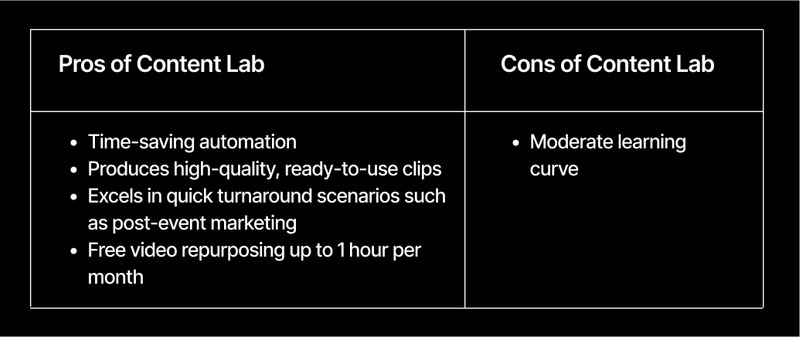
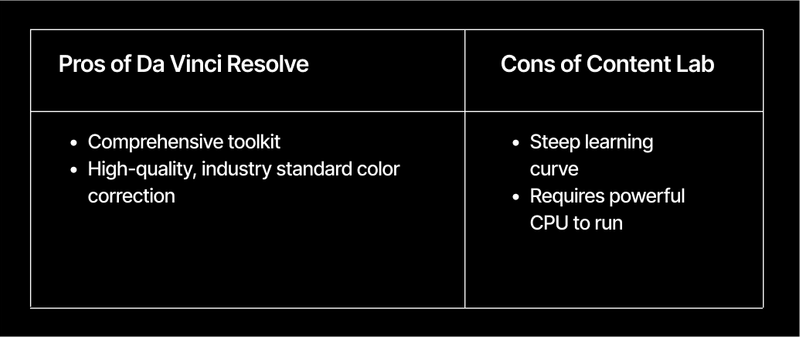
⚖️ Pros and cons
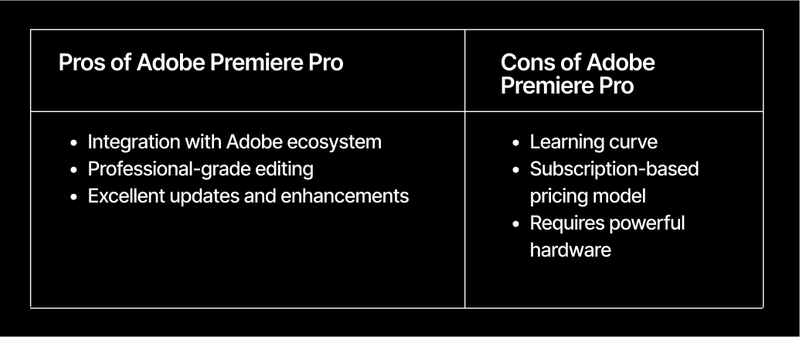
3. Adobe Premiere Pro
Adobe Premiere Pro is a leading video editing software known for its versatility and integration with other Adobe Creative Cloud apps.
🛠️ Notable features
- Seamless integration with Creative Cloud. Users can easily incorporate assets from Photoshop, After Effects, and other Adobe tools, which means efficient workflows.
- Comprehensive editing tools. Provides a wide range of editing options like multicam editing and advanced color correction.
- Efficiency-boosting AI features. Use AI to automatically create transcripts and captions, clean up dialog, and match colors.
⚖️ Pros and cons
4. Runway
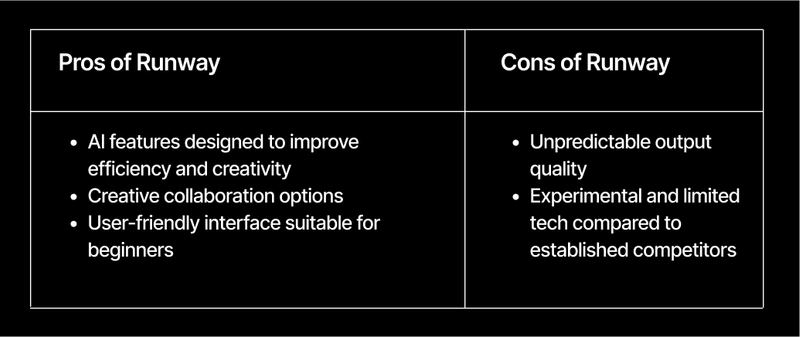
Runway is an AI-powered video generation tool with a focus on innovation, experimentation, and real-time exploration of ideas.
🛠️ Notable features
- AI video generation. Input a description or prompt to create video.
- AI video editing. Real-time video editing suggestions and automation for complex tasks speed up the editing process.
- Real-time collaboration. Multiple users can work on projects simultaneously.
- Prompt‑based creation. Generate scenes with simple text prompts, add stylized animations, and experiment beyond traditional footage.
- The latest effects. Users get access to a library of AI-generated effects and tools to spark creativity and experimentation.
⚖️ Pros and cons
5. InVideo
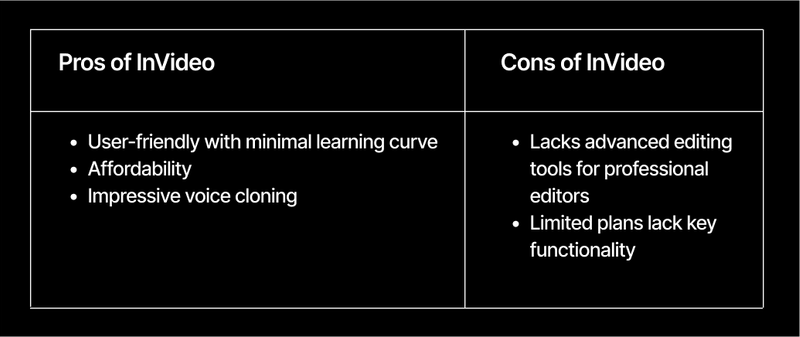
InVideo is a versatile video creation platform that lets users create engaging videos quickly without extensive editing skills.
🛠️ Notable features
- AI video generation. Input a description or prompt to create video.
- AI-powered template recommendations. Suggests the best templates and layouts based on your project type and goals.
- Text-to-speech synthesis. Converts written text into natural-sounding speech, making voiceovers a breeze.
- Smart resizing and reformatting. Automatically adjust video dimensions and formats for different platforms using AI.
- Ready‑made graphics. Drag‑and‑drop overlays, title cards, and intro templates designed for social media videos and quick tutorials.
- Effects library. Lightweight animations and transitions for any type of user.
⚖️ Pros and cons
6. ClipChamp
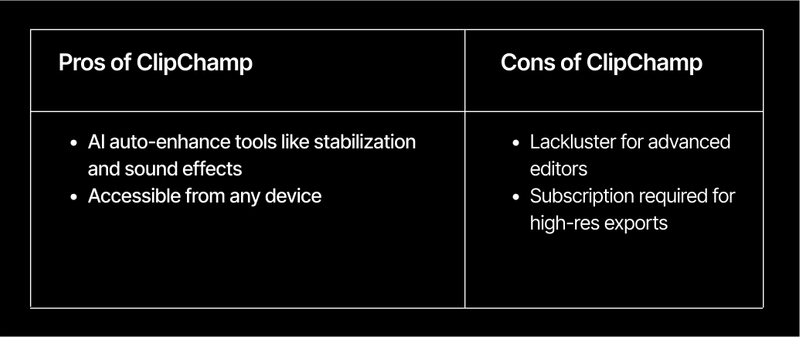
ClipChamp is a versatile editing platform that helps less techy users create their best videos efficiently. It was acquired by Microsoft shortly after it was founded in 2021.
🛠️ Notable features
- AI-powered stabilization. Automatically detects and corrects shaky footage without the need for manual adjustments.
- Intelligence video enhancement. Auto adjust lighting, color balance, and other aesthetics with a single click.
- Auto scene detection. Identifies and marks scenes within a video for quick navigation.
- One‑click refinements. Fast filters, transitions, and aspect ratio swaps for common channels.
⚖️ Pros and cons
7. Descript
Descript is a video editor laser-focused on ease of use—in its own words, “Descript works like the tools you’ve already learned.”
🛠️ Notable features
- Text-based video and audio editing. Edit media files by simply editing the text transcript.
- AI voice synthesis. Voiceover creation and audio corrections (like filler word removal) directly in the platform using AI.
- Auto scene detection. Automatically marks scenes to reach final cut without manual review.
- Audio cleanup. Reduce background noise and level voices for clearer talking head edits.
- Presentation polish. Basic eye contact correction and fast subtitle tools for crisp educational content.
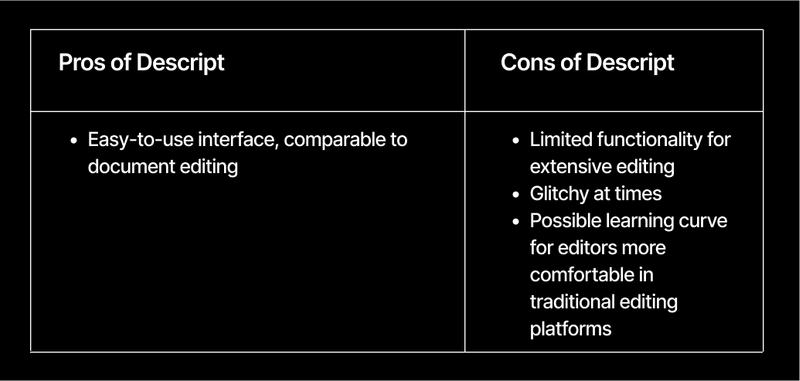
⚖️ Pros and cons
8. Synthesia
Synthesia lets users create high-quality videos using text input and digital avatars.
🛠️ Notable features
- AI-generated avatars. Users can create and customize digital avatars that speak multiple languages and adapt to different accents.
- Text to video. Converts written scripts into polished videos, making content production quick and accessible.
- Multi-language support. Creators can produce content for global audiences without hiring additional voiceover talent.
- Studio‑style outputs. Use AI avatars with branded overlays and clean intro screens for customer training and tutorials.
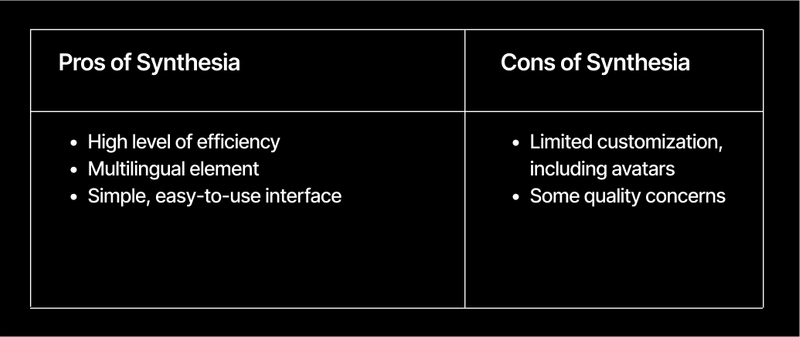
⚖️ Pros and cons
Features to look for in AI video editing software
Thinking about diving into the world of AI video production? Here are a few key features to look for during your evaluation process.
- Professional-grade output. Ensure the software can produce high-quality videos that meet your brand standards.
- AI-powered automation. Look for features that automate repetitive tasks like scene detection, color correction, and audio leveling.
- Ease of making manual changes. The ability to easily override AI suggestions ensures you can infuse personal touches and maintain precise control over the final product.
- Tailoring content to different platforms. The software should easily adapt content for various platforms—from social media to websites.
- Repurposing into different formats. Tools that repurpose video content into various formats, like blog posts, emails, and audiograms, help extend the reach and value of the original content.
- Search engine optimization. Look for AI features that improve discoverability, including automated captions and keyword incorporation.
- Collaborative tools for teams. Collaboration features are vital for larger teams, allowing multiple users to edit, comment, and review in real-time. If you’re building a production stack around an AI video editor, make sure it fits your end‑to‑end video production workflow and complements your repurposing strategy.
Content Lab automates the busywork so your videos work harder across your entire funnel. It auto-generates bite-sized social clips, engaging audiograms, and SEO-ready blog embeds, then builds on-demand previews to extend shelf life, composes event summaries for quick recaps, and drafts promotional and outreach emails that drive the next action.
One source video, many tailored formats—produced fast, on brand, and ready to publish.
Turn one video into many. Get 60 minutes of AI repurposing on us and ship social posts, audiograms, and SEO-ready embeds fast.
Build pipeline faster with AI-powered video workflows
For B2B teams, video isn’t just “nice to have”—it’s where mindshare and pipeline are built. Here’s the simple math:
- Save hours you don’t have. AI trims, transcribes, cleans audio, adds captions, and surfaces the best moments automatically—so you spend time on story, not scrubbing timelines.
- Clip by intent, not guesswork. When your editor is connected to event engagement data (chat spikes, Q&A peaks, watch-time), you get highlight reels that map to what your audience actually cares about.
- Publish everywhere, fast. Auto-resize, reformat, and version content for LinkedIn, your YouTube channel, email, blog, TikTok, and your on‑demand hub.
Events and webinars are the fastest way to produce authoritative video at scale. With AI editing, every session becomes a content engine—spinning out clips, audiograms, blog embeds, summaries, and promos that fuel campaigns for weeks.
Because the editor understands engagement signals, the strongest moments get clipped and amplified across social and sales follow‑ups, driving higher reply rates and watch-through. And with brand-safe templates and voice controls, you get consistency across formats without extra design cycles—so your message lands the same way everywhere.
120 minutes to 5—AspenCore’s repeatable content flywheel
- Before: 2 hours per clip post‑event.
- After: under 5 minutes with Content Lab—plus variations for social, email, and on‑demand.
- Result: A repeatable content flywheel from every virtual event.
More clips, faster distribution, clear ROI
If you run webinars, shows, or virtual events, AI editing is the fastest path to more content, better distribution, and clearer ROI—without adding headcount.
For B2B teams, tools that generate clips based on engagement signals (chat spikes, Q&A peaks, watch-time) turn moments that resonate into assets that perform.
Try Goldcast Content Lab free. Get one hour of AI repurposing per month—auto‑generated clips, blogs, social posts, and more—shipped fast and on brand. If you’re deciding on the best AI video editor for your team, start here and see Goldcast in a live environment.
FAQs
What can AI video software actually do?
AI accelerates the busywork: auto‑transcription and captions, filler‑word removal, audio cleanup, scene detection, color matching, resizing/reformatting for each platform, and highlight detection. The best tools go further—using engagement signals like live chat data, Q&A, time-in-session, and more to auto‑generate clips your audience actually wants.
Which features should B2B marketers prioritize?
- Engagement‑aware clipping (not just “top moments”)
- Multi‑format outputs (social clips, audiograms, blog embeds, email copy)
- Brand controls (templates, voice/tone, fonts/colors)
- Easy overrides for manual edits
- Integrations to your GTM stack and on‑demand hubs
- Team collaboration and review
- Reliable audio tools (noise reduction, voice leveling)
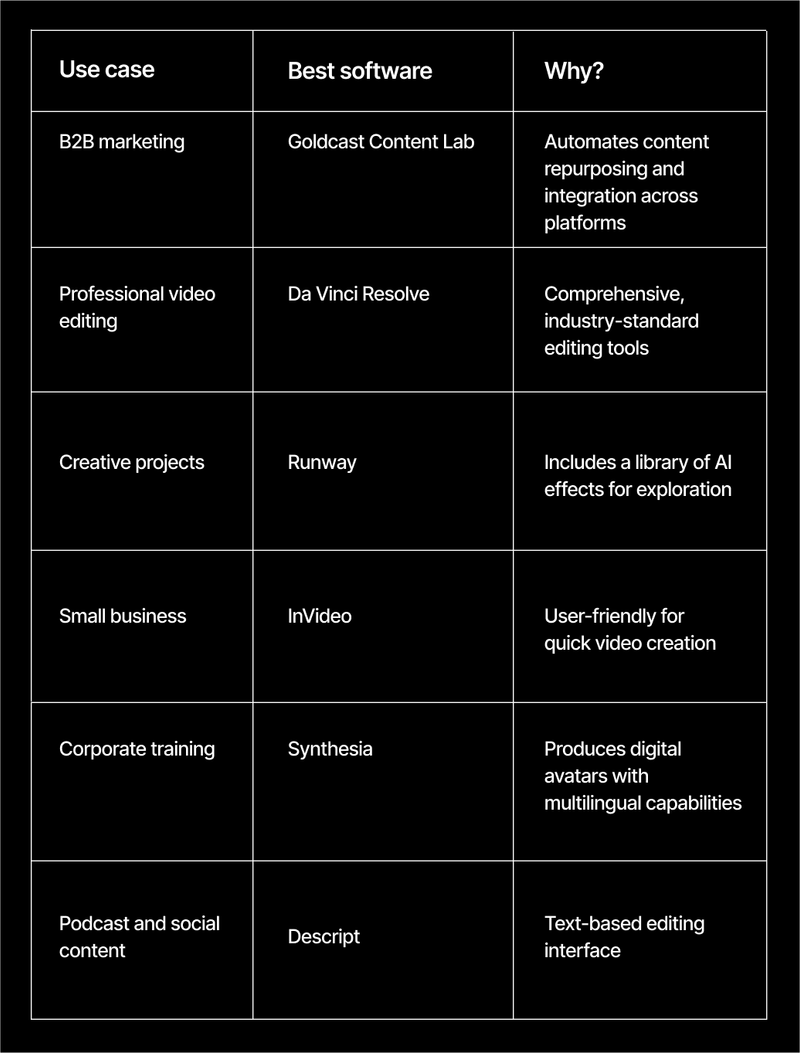
What are the best AI video tools—and when should I use each?
- Content Lab: Post‑event repurposing and engagement‑based clips across channels
- Adobe Premiere Pro: Professional editing inside the Creative Cloud
- DaVinci Resolve: Cinematic color and advanced finishing
- Descript: Script‑to‑edit workflows and voice cleanup
- Clipchamp: Fast, template‑driven social content
- Runway: Prompt‑to‑video experimentation and effects
- Synthesia: Avatar‑led explainers and multilingual training
- InVideo: Template‑driven marketing videos with text‑to‑speech
How does AI improve post‑event ROI?
By turning each session into a content engine: AI clips your highest‑engagement moments, builds audiograms, drafts recaps and emails, and formats assets for LinkedIn, YouTube, and your on‑demand hub. More assets, faster distribution, clearer attribution.
Will AI replace human editors?
No. AI handles repetitive tasks and surfaces “what’s interesting.” Humans shape narrative, ensure accuracy, and keep brand voice consistent. Think co‑pilot, not autopilot.
What about quality and brand consistency?
Look for brand‑safe templates, voice controls, and easy manual overrides. Your team sets the guardrails; AI stays inside them.
How steep is the learning curve?
Tools like Content Lab, CapCut, and Descript are beginner‑friendly. Premiere and Resolve are deeper but essential for heavy editing. Most teams run a hybrid stack: AI repurposing for speed, pro editors for complex work.
Does AI help with SEO?
Yes—accurate captions, transcripts, and structured blog embeds improve discoverability. Repurposed summaries and snippets boost internal linking and organic distribution.
Is there a low‑risk way to try this?
Yes. Start with a single webinar. Run it through Content Lab to generate clips, audiograms, summaries, social posts, and an SEO‑ready embed. Measure watch‑through, click‑through, and follow‑up replies. Iterate from there.
Transform Your Video Marketing with AI

© 2026 Copyright Goldcast, Inc. All rights reserved.
YOUR PRIVACY CHOICES