




 Upcoming Events
 Event Series
 On-Demand Events


The Real Cost of Video Marketing for B2B Teams

Table of Contents
Maximize Your Marketing ROI
Join 10,000 other marketers already getting the best tips on running engaging events that boost pipeline and create raving fans.
Video works. But for a lot of B2B teams, it still feels expensive and messy. The workflow is stitched together across scripting, recording, editing, distribution, and analytics tools—none of which actually talk to each other. This “duct tape” setup adds cost, friction, and hours of manual work—and makes video production pricing hard to predict across projects.
So “how much does video marketing really cost?” The better question is “how do we maximize ROI across the video lifecycle?” Because in 2026, video is one of the fastest ways to build and keep mindshare in crowded B2B markets—from video ads to webinars to short-form for social media and TikTok.
According to the latest data, 89% of businesses use video in their marketing mix, short-form gets the highest engagement, and webinars and product demos deliver the strongest ROI. And per Wistia, nearly half of companies spent less than $5,000 on videos last year, indicating a broad price range and lower-entry average cost.
In this guide, we’ll break down the full cost picture and share practical ways to get more out of every video. Even if you’re not overhauling your stack tomorrow, knowing which factors drive the highest costs will help you work that budget.
Turn video from cost center to growth engine—without the multi-tool tax
Key takeaways
- Efficiency beats austerity. Don’t cheap out; streamline. Eliminate handoffs, maximize reuse, balance production quality with speed.
- Think lifecycle, not line item. Optimize repurposing and measurement—not just production—and tie it to your broader marketing strategy.
- Audit your “duct tape tax.” Tool sprawl, manual steps, and scattered analytics inflate costs more than you think and blur your true overall cost and ROI.
- Measure what matters. Views alone don’t pay the bills. Track pipeline influence, qualified engagement, and brand awareness lifts with your target audience.
- Unify to amplify. Unify creation, repurposing, and measurement to make video predictable and revenue-driving.
Deconstructing the traditional costs of video production
When we talk video cost, most people picture cameras, software, or five-figure agency retainers. For a clearer picture of the expenses involved, look at how video costs play out across three key phases: pre-production, production, and post-production.
Each stage requires strategy, creative, and logistics. Costs can shift based on complexity, brand requirements and turnaround, the number of shooting days, and whether you hire a video production company or opt for a DIY video approach.
Here’s a typical video budget broken down by phase:
- Pre-production (~25%): Strategy, scriptwriting, storyboarding, logistics, and approvals—the groundwork that drives efficiency later.
- Production (~50%): Crew, equipment, lighting, locations, and talent. Usually the largest spend, including production crew (producer, camera operators, cinematographer), on-camera talent or voiceover, and contingency for extra shooting days.
- Post-production (~25%): Editing, motion graphics, color, sound design, captioning, and versioning.
These percentages vary by format (e.g., a talking-head clip vs. a fully animated explainer). The more disconnected the stages are, the harder it is to predict and control your costs and maintain consistent production value in the final product.
Which specific factors drive video marketing costs?
Beyond the type of video itself, there are a few core variables that make a big impact on how much you’ll spend:
- Length and complexity: Short, simple formats cost far less than scripted, multi-location brand films. Longer videos and high-end concepts increase the overall cost.
- Talent and crew: On-camera presenters, voiceover actors, and larger crews raise production cost.
- Design and animation: Custom motion graphics or 3D animated video can double or triple post-production time.
- Revisions and approvals: Each round adds hours (especially with siloed vendors and tools).
- Distribution needs: Platform-specific versions (LinkedIn, YouTube, website) adds both editing and formatting work to fit the video style expectations for social media, YouTube, TikTok, and LinkedIn video ads.
- Asset choices: Leveraging stock footage can lower video production costs, while bespoke shoots raise production value and cost.
- Vendors: Production companies and video producers use different pricing models (fixed bid vs.hourly rate), which affects the price range.
Cost by video type and production model
Here’s a clear, side-by-side look at typical budgets by video type—whether you go in-house, freelance, or agency.
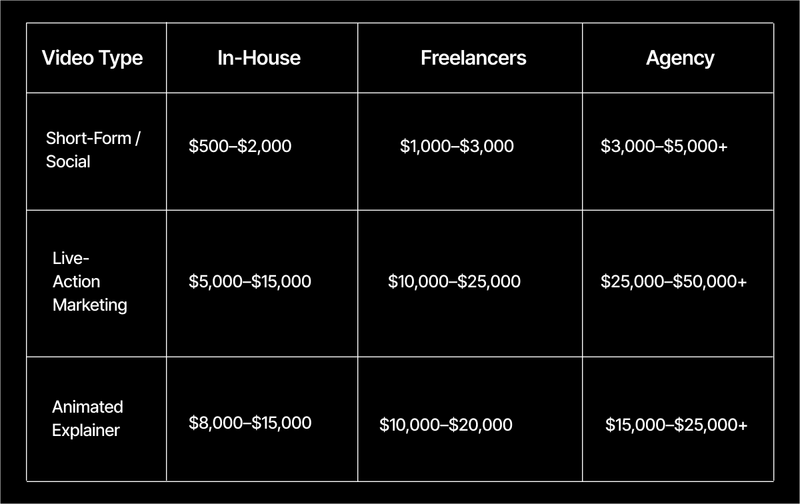
Keep in mind, these are just the production costs. Planning, distribution, and analytics require a whole other batch of resources. Generally speaking, you can expect costs to climb with longer runtimes, multi-location shoots, complex creative, and paid talent. If you’re working with a video production company, make sure to budget for producers, crew, talent, travel, and post-production—each line item will impact your total video production pricing.
The good news for smaller teams is that, with nearly half of companies spending less than $5,000 on videos last year, a basic video or single-day shoot can fit lean budgets if you get smart about how you reuse assets and simplify the production process.
Uncovering the invisible costs of a fragmented video strategy
The invoice only tells part of the story—the real drain is operational leaks. When planning, recording, editing, and distribution live in separate tools, the “duct tape tax” spikes costs and slows output. Stitching together Zoom, Riverside, and Descript/Premiere creates tool sprawl and duplicate work—especially across a multi-stakeholder production team.
Here’s where the duct tape tax hits hardest:
- Wasted time: Hours lost to manually downloading, uploading, and transferring files between platforms.
- Increased labor: Paying skilled editors or agency retainers for simple, repeatable tasks like trimming or captioning.
- Data silos: Engagement metrics spread across multiple tools, making it impossible to track or compare performance, and harder to justify ROI.
Practical ways to fix it:
- Standardize templates and formats. Create consistent file naming, layouts, and brand templates so editors spend less time searching for assets.
- Batch production days. Record multiple videos in one session to minimize setup and teardown time.
- Streamline revisions. Agree on outlines or scripts upfront to limit costly, time-consuming feedback rounds.
- Automate repeatable steps. Even free or low-cost AI tools for captions, transcription, and editing can save hours per project and protect production value while reducing total video production costs.
These changes alone can deliver double-digit cost reductions. As volume scales, a unified system multiplies savings by removing manual steps entirely.
Last but not least, consider the cost of lost potential. In a market where buyers are nearly 70% through their purchasing process by the time they reach out, the priciest videos aren’t the ones you produce—they’re the ones you don’t reuse.
Repurposing is where the ROI compounds. With a streamlined process for repackaging your video content, a single hour-long webinar can yield:
- 10–15 social-ready clips
- 3–5 quote cards or email snippets
- 1–2 blog posts or resource summaries
Yet most teams post the recording and move on. No matter how you Underused footage = lost ROI, especially with short-form video driving performance in B2B.
If you’re on a tight budget, start with low-effort, high-yield formats:
- Use free or low-cost AI clip generators to pull key highlights from recordings
- Turn transcripts into short-form social posts or blog intros
- Create “evergreen” versions of videos that can be reused across future campaigns, including tutorial content and customer testimonials tailored to your target audience.
The right workflows will help you stretch your budget and make ROI visible, long before you scale into a video-first content engine.
From one recording to dozens of ready-to-publish assets—fast. Goldcast users produced 226,006 assets in Content Lab, including 131,296 clips and 94,710 text (a 2,903% and 11,464% increase).
How to estimate your ROI on video marketing spend
Most teams track video spend; fewer track the return. Don’t expect perfect attribution. Instead, start by tying outcomes to pipeline influence and qualified engagement—not just views.
Here’s how to calculate your ROI with one straightforward formula:
ROI = (Revenue attributed to video − Total video spend) ÷ Total video spend × 100
Example: spend $10,000; video-influenced revenue is $25,000 → ROI = 150%.
If revenue data’s fuzzy, consider tracking the following metrics:
- Cost per engagement = total spend ÷ total views, clicks, or interactions
- Cost per lead = total spend ÷ new leads generated from video campaigns
- Cost per repurposed asset = total spend ÷ number of clips, blog posts, or social assets created from one video
These metrics help you quantify the efficiency of your video marketing. For example, if a $3,000 webinar generates 15 social clips and 10,000 combined views, you can track both content output and engagement cost per unit.
The data’s decisive. According to Wyzowl, 93% of marketers say video drives ROI. Success is tracked via engagement (66%), views (62%), brand awareness/PR (40%), retention (36%), and sales (30%). Reported outcomes: improved understanding (99%), boosted awareness (96%), higher sales and dwell time (84%), and reduced support queries (62%). What’s not to like?
If this all sounds like too much to keep an eye on, don’t worry. Just stick with the top 3-5 KPIs that best align with your marketing strategy today.
The more consistently you measure your video metrics, the easier it becomes to benchmark your success. Over time, you’ll be able to quickly identify where better processes and workflows can drive even greater ROI.
Turn video from a cost center into a revenue powerhouse
Reducing cost is never just about cutting expenses. It’s about optimizing ROI.
For smaller marketing teams, that might mean tightening processes and layering in some light automation. For more mature programs, it might mean consolidating workflows so that production, repurposing, and measurement happen in one place.
Whatever your situation, here are a few realistic levers to pull:
- Plan before you record: Create scripts, shot lists, and outlines upfront to avoid reshoots and wasted footage. Clear scriptwriting reduces video production costs and keeps the final product on brand.
- Batch production: Record multiple videos in one session to minimize setup, teardown, and crew costs.
- Use templates and brand kits: Reuse intros, outros, overlays, and lower-thirds to save design and editing time.
- Repurpose smartly: Plan for reuse from the start—one webinar can become short-form clips, blog posts, and social snippets. (Here’s a quick look at how we repurpose internally here at Goldcast.)
- Use AI tactically: Leverage affordable tools for transcription, trimming, or captioning to reduce editing time.
These optimizations deliver immediate impact by reducing common video production time-drains. When you consolidate later, these efficiencies compound.
Create, amplify, and measure from a single unified video engine
As you scale, one-off savings matter less than system-wide efficiency. Treat video like a supply chain: unify creation, amplification, and measurement under a repeatable framework.
Think Create → Amplify → Measure:
- Create: Centralize video production across recurring formats—such as podcasts, events, and demos—using shared templates and brand controls to maintain consistency across your video production process and video production services.
- Amplify: Use AI to quickly repurpose long-form recordings into ready-to-publish clips, social posts, or blog content.
- Measure: Connect engagement data to your CRM for visibility into how video influences pipeline, conversions, and revenue.
A unified video platform makes the whole engine scalable: create, repurpose, and measure in one place. By eliminating handoffs and tool sprawl, you get faster output, lower post-production costs, and cleaner data that ties engagement to pipeline—turning video into a predictable, repeatable growth lever.
Not ready to consolidate? Start with the foundations. Centralize your asset library, standardize templates and brand kits, and automate repeatable edits like captions, trims, and clip generation. These changes cut friction today and set you up for a smooth transition to an end-to-end workflow tomorrow.
How AI reduces post-production costs
The most expensive minutes in video are the ones spent after recording. AI shrinks that cost center by handling the work humans shouldn’t—mechanical edits, captioning, and formatting—while preserving brand quality.
And it’s not just theory—85% of marketers say they saved significant costs on video production after incorporating AI.
- For smaller teams: automate basics like trims, captions, aspect ratios, and clip generation to turn long recordings into channel-ready assets fast—accelerating video creation across social media and on-site hubs.
- For larger orgs: standardize brand templates and automate the entire pipeline—rough cuts, caption styles, lower-thirds, resizing, and exports—so editors focus on creative, not chores and protect production quality at scale.
Goldcast’s Content Lab turns a single recording into dozens of clips and text assets in minutes, ready for LinkedIn, YouTube, or your website. AI agents kickstart pre/during/post workflows, transforming a single recording into dozens of short-form clips in minutes.
Companies like Brandwatch have seen up to 92% increases in productivity using this approach, freeing marketing teams to focus on what matters most: building narratives that move audiences and driving measurable revenue impact.
Build a smarter video marketing budget
Strategic teams budget for efficiency and ROI. Ask: how do we create the most pipeline and brand impact per dollar? With this mindset, video shifts from a creative expense to a measurable growth driver. Here’s where to start.
1. Anchor your budget in revenue goals and mindshare
Budgeting around revenue influence and mindshare helps you defend spend—and scale it. Define success by pipeline movement and qualified engagement. Treat mindshare as the new ROI—consistent, high-quality video that keeps you top-of-mind throughout long buying cycles.
2. Audit your hidden video tax
Uncover the real total cost. Audit your hidden video tax—the costs that don’t show on an invoice but drain productivity and ROI.
Include items like:
- Subscriptions for multiple disconnected video tools.
- Agency or freelancer fees for basic editing or repurposing tasks.
- Hours spent manually downloading, uploading, and transferring files between systems.
Add it up and the “cheap” way often isn’t cheap. That hidden tax can inflate total cost of ownership by 20-40%.
3. Invest in a platform, not just projects
Shift from project-by-project to platform investment. One end-to-end system can replace 3–5+ point tools and turn unpredictable costs into a consistent, measurable investment.
Consolidate recording, editing, repurposing, and analytics under one roof. When you centralize the full workflow, output accelerates, costs become predictable, and attribution gets clearer.
It pays off. FullStory saw an 8× pipeline increase after centralizing with Goldcast. Budget around efficiency and ROI—not volume—and video becomes a scalable, measurable revenue lever.
Build a video engine that drives mindshare and revenue
Most teams don’t overspend on one video—they overspend in the gaps between tools and handoffs. First step: remove operational friction.
When recording, editing, distribution, and measurement live in one workflow, work gets reused—not redone—and real performance data guides the next sprint.
Goldcast is built for this. With a unified workflow, teams cut the multi-tool tax, ship more content from the same inputs, and tie video to pipeline.
Ready to cut the duct tape tax and make video ROI predictable? Explore Goldcast or schedule a demo today.
Video marketing cost FAQ
How much does a 2-minute explainer video cost?
It depends on style and complexity. A 2D animated 2-minute explainer often ranges $5,000–$12,000; live-action can be similar or higher based on talent, locations, and timeline, vendor (production companies vs. in-house), and video production pricing models.
What is a typical day rate for a freelance videographer?
Common ranges: $600–$1,200/day, with top-tier pros in major markets at $2,000+. Rates often include basic camera, audio, and lighting gear; confirm hourly rate vs. day rate, deliverables, and final product specs upfront.
Is it cheaper to hire a video agency or build an in-house team?
For a single project, an agency is typically cheaper than building in-house. If you’re producing at high volume, in-house can be more cost-effective long term—but expect management overhead and scalability challenges. Hybrid models—keeping strategy in-house and outsourcing specialized roles (e.g., cinematographer, voiceover)—can optimize overall cost.
How can I create high-quality video on a small budget?
Focus on efficiency: plan and script; use existing locations and employees; invest in editing; and repurpose every long-form asset into clips, social posts, and emails. Try Content Lab free and see the help guide to make it easy to get started.
How does Goldcast reduce total video marketing costs?
Goldcast replaces a fragmented stack with one platform for planning, recording, repurposing, on-demand hosting, and analytics. Automation and AI cut manual steps, while integrations tie engagement to pipeline.
This unified approach standardizes video production process and video production services, improving predictability in pricing and the production budget.
Ready to turn video into a measurable growth engine? Book your demo today.
Transform Your Video Marketing with AI

© 2026 Copyright Goldcast, Inc. All rights reserved.
YOUR PRIVACY CHOICES