




 Upcoming Events
 Event Series
 On-Demand Events


Webinar Promotion Simplified: Top 5 Channels for Registrations

Table of Contents
Maximize Your Marketing ROI
Join 10,000 other marketers already getting the best tips on running engaging events that boost pipeline and create raving fans.
Webinars have cemented their place in the B2B marketing playbook, with companies averaging nearly five per month according to our latest Webinar Benchmark Report.
Short, educational, and easy to access, a well-planned webinar helps busy professionals level up fast, while giving marketers access to authentic, repeatable moments that build real pipeline.
But if you’ve ever spoken into the void of an empty Zoom meeting before, you know that real webinar success is all about getting the right people in the room, starting with your webinar promotion strategy.
Skip the random acts of webinar promotion.
Build a repeatable system that drives registrations and revenue.
5 webinar promotion ideas to drive registrations
- Social media
- Employee enablement
- In-app
- Communities and creators
1. Email
With an already-warm list of subscribers, email is the most effective webinar promotion channel for bringing in those sweet, sweet registrations.
Use your webinar email strategy to:
- Target only the most relevant segments; skip the broad blasts, A/B test your webinar email templates, and optimize your open and clickthrough performance.
- Brand the invitation with your company or webinar series brand kit to make it easy for folks to recognize you (even in crowded inboxes).
- Tell recipients exactly what you want them to do as early as your subject lines, for example “grab a seat.”
- Highlight top sessions or speakers and give recipients a sneak peek to spark curiosity.
Build your webinar email sequence, including branded templates starting two weeks out from the event.
14 days out: the invite
This email should answer the:
- What: your webinar topic
- Why: the need for the topic
- When: date and time
- Who: speakers and presenters
- How: your call to action (CTA)
7 days out: first reminder
Customize this email for three specific list segments:
- Registered attendees
- Recipients who opened but didn’t respond
- Those who didn’t open
1 day before: second reminder
This is your last chance to convert, include:
- Webinar date and time
- Add to calendar link
- Single-click webinar join CTA
- Shareable link to invite peers
- Countdown timer
1 hour before: final reminder
Now the goal is one thing: boost that show rate.
- Recap the value
- Add multiple join links
- Include a magic link for instant access
2. Social media
Get in front of a warm audience of fans and followers, while reaching new audiences via paid ads. Make deliberate choices, not noise:
- Tailor copy and creative to each channel; don’t copy-paste.
- Pick 2-3 channels where your audience actually engages.
- Post consistently (at least weekly), increase cadence on fast-moving platforms like Insta and X.
- Use ads to extend reach, especially if your organic following is small.
Top assets created from webinar content:
- Social posts: 37.9%
- Emails: 35.9%
- Blogs: 13%
- Takeaways: 13%
- Custom: 0.2%
3. Rally your community
One of the surest ways to get your webinar in front of the right people is to rally your team on LinkedIn. Organic updates from your partners, speakers, and founders puts your event directly in the feeds of folks you know are qualified.
Make your webinar promo easy for your team to share:
- Create personalized templates that can be copied across platforms.
- Ask team members to add the registration page link to their email signatures.
- Share common FAQs in case anyone from their network asks for more info.
- Provide a list of messaging do’s and don’ts (e.g., examples of specific words and phrases you don’t want associated with your brand.)
- Give access to creative assets and links.
Once they’ve got the right resources, encourage partners and employees to promote your webinar in key customer communities.
Offer more intensive support to customer-facing teams like sales and customer success, who can invite customers and prospects directly.
Wanna really spice things up? Sweeten the deal with a reward for the team member who does the most to promote your event.
“We asked employees to put our virtual event picture as their display picture on all of their social media platforms and ask their friends to do so as well, with the incentive that one lucky winner would receive a $1,000 gift,” explains Ayman Zaidi, Digital Marketing Manager at GreatPeopleSearch.
4. In-app promotion
It’s easy to get tunnel vision around targeting net new prospects and leads, but your existing customers can be an excellent source of quality registrations. If you have a free trial or self-serve option, use A/B targeting to reach only these users. Then adjust your in-app targeting to reach the most relevant cohort.
Places to position your in-app promotions:
- Add a CTA (call-to-action) on your app login page.
- Use pop-ups that trigger on key user criteria.
- Promote via banner and preview alerts in the user’s notification center.
Build awareness for future events by making your webinar content available on demand in a dedicated section of your product resource center.
5. Creators, influencers, and communities
With the right partnership, including crystal-clear alignment on message and target audience, you can leverage a creator’s platform to build credibility for your webinar series, or even create experiences exclusively for their audiences.
Look for overlap signals (topic affinity, engagement from target job titles, follower quality vs. vanity), and align on the message you want to land. If they can’t credibly influence your buyers, keep looking.
When you find the right ones, bring them in early. Co-develop the angle, share assets and talking points, and make the creator part of your plan (not a one-off post!). Promote their sessions in your channels, have them share yours in theirs, and give trackable links so both sides can see what’s working.
Run it yourself
From the best days and times to host your webinar, to the optimum length, name, attendee count and engagement levels, our B2B Webinar Benchmark Report has you covered.
Webinar marketing that gets butts in seats
Promoting your webinar is one thing. You still need to make sure your registered attendees actually show up for the live event:
- Use UTM links. Track attribution to learn what works at a channel and rep level.
- Optimize your registration page. Your webinar needs to stand out and make a great first impression, starting with a clear webinar landing page.
- Add calendar holds for one of the simplest ways to boost your show rate.
- Promote your next event in your follow-up email.
Less noise, more registrations: build a lean promo engine
You don’t need a kitchen‑sink promo plan to fill the room. You need a tight, repeatable engine that focuses on where your buyers already pay attention.
Start small. Nail the channels that move the needle for your audience. Then iterate with what the data tells you and turn it into a playbook you can run every month.
Make running regular webinars easier.
Get your personalized demo today, or upload your first video recording to Goldcast Content Lab and start repurposing your webinar recordings into social media posts, blog drafts, and email snippets to promote your next event.
FAQs
What’s a good webinar attendance rate?
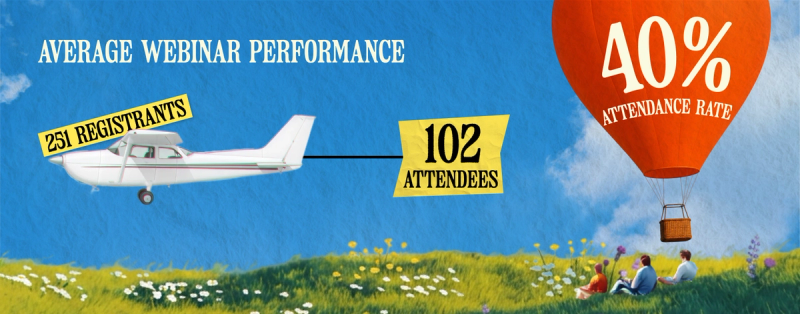
The current average attendance rate is about 40%.
How many registrants should we expect?
Our latest benchmark data shows an average of 251 registrants and 102 attendees per webinar. Actuals vary by list quality, topic relevance, timing, speakers, and promo mix.
Which channels typically drive the most registrations?
Start with email. Use past webinar content to layer in social promo, and partner enablement (via share kits, email signatures, FAQs, and swipeable approved copy), in‑app prompts for customers/trial users, and targeted communities/creator partners for reach and credibility. Track everything with UTMs.
How early should we start promoting a webinar?
Start 2-3 weeks out. Run organic social at least weekly (increase cadence during the final 5-7 days), and add a 7-10 day paid social run if your budget allows. For customers or freemium users, pair this with in‑app nudges and a login-page CTA.
Transform Your Video Marketing with AI
© 2026 Copyright Goldcast, Inc. All rights reserved.
YOUR PRIVACY CHOICES