




 Upcoming Events
 Event Series
 On-Demand Events


Podcast Recording Platforms: Top Solutions for Creators

Table of Contents
- What are podcast recording platforms and why invest in them?
- Enterprise content creation & experience platforms: Goldcast
- Professional remote recording solutions
- Creator-focused production & streaming tools
- How to choose podcast recording platforms
- Transform your podcast recording workflow
- Podcast recording platform FAQs
Maximize Your Marketing ROI
Join 10,000 other marketers already getting the best tips on running engaging events that boost pipeline and create raving fans.
Recording a podcast used to mean booking studio time, hiring engineers, and coordinating schedules across time zones. Today's podcast recording platforms deliver studio-quality audio and video from anywhere, enabling creators to produce high-quality podcasts with tools that handle everything from guest coordination to AI-powered editing — all without technical expertise or expensive equipment.
This guide examines leading podcast recording platforms across three categories: enterprise content creation solutions built for marketing teams, professional remote recording tools designed for distributed production, and creator-focused platforms that combine recording with streaming capabilities:
- Enterprise Content Creation & Experience Platforms
- Goldcast
- Professional Remote Recording Solutions
- Riverside.fm
- Zencastr
- SquadCast
- Boomcaster
- Creator-Focused Production & Streaming Tools
- Descript
- StreamYard
- Podcastle
- Restream
What are podcast recording platforms and why invest in them?
Podcast recording platforms are software solutions that enable creators to capture, produce, and optimize high-quality audio and video content. Modern platforms go beyond basic recording to offer local HD capture, automatic transcription, AI-powered editing, multi-track recording, and real-time collaboration. They're designed to handle the technical complexity, so you can focus on creating great content.
Investing in the right platform transforms podcasting from a resource-intensive project into a scalable content engine. Professional platforms automatically distribute episodes across major directories like Spotify while creating repurposed assets like clips, blog posts, and social content; this expands your reach without adding headcount.
Recording platforms also provide analytics that show which topics resonate and which episodes drive engagement, helping you make smarter content decisions. Most importantly, they consolidate recording, editing, and distribution into one workflow, eliminating the tool sprawl that slows production and increases costs. For B2B teams specifically, advanced platforms track engagement data and sync with your CRM, connecting podcast performance directly to pipeline and revenue.
Enterprise content creation & experience platforms: Goldcast
Most podcast recording platforms focus narrowly on capturing audio and video. Enterprise solutions take a broader view, connecting recording to your content strategy, distribution workflow, and business outcomes.
Goldcast is the only B2B video content platform purpose-built for marketing teams who view podcast recording as part of a comprehensive content strategy. While other platforms stop at producing a finished audio file, Goldcast connects your podcast recording to AI-powered repurposing, branded distribution, and revenue measurement.
The platform's Recording Studio captures studio-quality audio and video through local recording technology, so your production quality remains consistent regardless of internet stability. Each participant's audio and video records directly on their device, then uploads to the cloud. This approach eliminates the quality compromises and dropped connections that plague platforms relying on real-time streaming.
What separates Goldcast from traditional recording platforms is what happens after you're done recording. Your recording immediately flows into Content Lab, where AI identifies key moments, generates branded clips optimized for social platforms, drafts blog posts with embedded video segments, and creates email copy, all in your brand voice. This integrated workflow means one 45-minute recording becomes 20+ marketing assets without manual export, file transfers, or jumping between tools.
Key products and features
Here are the key features within the Goldcast platform:
Goldcast Recording Studio provides HD local recording with separate tracks for each speaker, giving you complete control during post-production. Dynamic layouts let you switch between speaker views, and producers can manage everything backstage without interrupting the flow. Text-based editing makes podcast editing as intuitive as editing a document; simply delete words from the transcript and the audio adjusts automatically. Plus, guest invites and calendar holds happen automatically when you schedule a session.
Goldcast Content Lab transforms your podcast recording into a complete content suite using AI trained on your brand voice. The platform analyzes your episode, identifies quotable moments, generates short-form clips with branded captions, drafts multi-format blog posts with inline video, and creates social media posts paired with relevant snippets. The AI learns your messaging and tone, ensuring everything sounds authentically like your team wrote it.
Goldcast Events extends beyond recording to live and virtual event production. Host webinars, panels, and live podcast recordings with interactive features like polls and Q&A, and then convert the session afterward into on-demand content.
AI-Powered Content Search makes your entire recording archive searchable by topic, speaker, or keyword. Search instantly returns specific moments across all episodes, transforming your podcast library from a static archive into an active resource for campaign creation and sales enablement.
Goldcast Agents are AI-powered, agentic tools that create, optimize, and amplify your video content at scale. Unlike traditional AI features that simply assist with tasks, these intelligent agents understand your brand, anticipate needs, and execute across the customer journey.
Traditional recording platforms force you to choose between ease of use, production quality, or post-production flexibility. Goldcast delivers all three while integrating seamlessly with your B2B marketing stack.
Pricing
Goldcast offers solution-specific pricing, and there is a forever-free version of Content Lab as well. Request a demo to explore pricing options tailored to your organization's needs!
Who it's ideal for
Goldcast is built for B2B marketing teams — specifically demand generation, content marketing, and event marketing professionals who measure podcast success by business impact rather than download counts alone. The platform suits organizations ready to consolidate their content production stack and treat video as a strategic asset that drives pipeline.
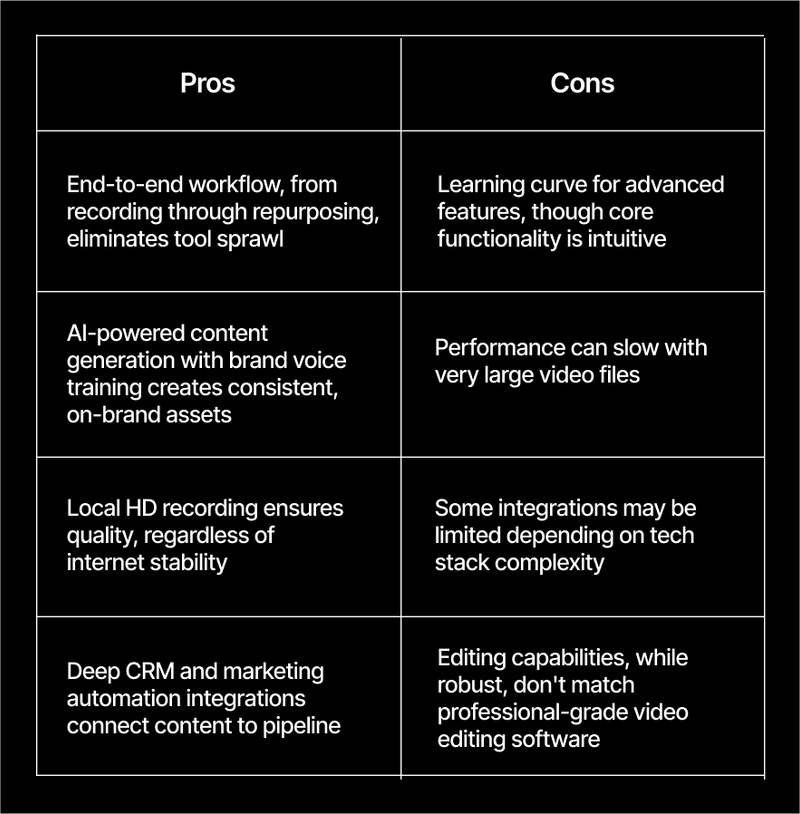
Pros and cons
Turn Recordings Into Revenue Drivers
See how B2B teams use Goldcast to record podcasts and then automatically generate clips, blogs, and social content that influences pipeline.
Professional remote recording solutions
This category focuses specifically on capturing high-quality audio and video when participants are in different locations. These solutions excel at solving the technical challenges of remote production: ensuring quality regardless of internet conditions, recording separate tracks for each speaker, and providing backup protection against technical failures.
Riverside.fm
Riverside.fm captures 4K video and uncompressed WAV audio locally on each participant's device, ensuring broadcast-quality results regardless of network conditions. The software combines recording with live streaming capabilities and includes text-based editing and AI tools for clip generation and filler word removal.
Best for: Video podcasters interviewing remote guests who need reliable quality and want integrated editing tools
Pricing: Free plan includes 2 hours of recording; paid plans start at $24/month
Zencastr
Zencastr delivers browser-based capture for up to 12 participants without requiring downloads or guest accounts. The platform's local recording technology preserves pristine audio even when internet connections falter, with progressive upload ensuring sessions save continuously to the cloud. An iOS mobile app extends capabilities beyond desktop.
Best for: Podcasters who prioritize guest experience and need an easy way for participants to join and record high-quality audio
Pricing: Free plan available; paid plans start at $24/month
SquadCast
SquadCast uses patented progressive upload technology that continuously saves content to the cloud during sessions, providing over 99% reliability even if participants disconnect. The service captures separate audio and video tracks for each of up to 10 participants, with real-time monitoring for producers.
Best for: Professional podcasters and media companies who prioritize recording reliability and need producer-level controls
Pricing: Free plan available; paid plans start at $16/month
Boomcaster
Boomcaster combines local capture with real-time production tools, letting you switch layouts, add graphics, and incorporate music during sessions. Automatic post-processing generates a finished episode automatically when your session ends. Simultaneous recording and live streaming means you can broadcast while preserving high-quality local files.
Best for: Podcasters who want live production capabilities and finished episodes without extensive post-production editing
Pricing: Plans start at $20/month
Creator-focused production & streaming tools
These solutions blend capture capabilities with broader content creation features, incorporating streaming, editing, and content repurposing alongside core functionality. The tools in this category prioritize accessibility and ease of use while maintaining professional quality standards.
Descript
Descript revolutionized podcast editing by making it work like editing a document. The platform's Underlord AI removes filler words, enhances audio with Studio Sound, and identifies clip-worthy moments. Descript Rooms enable remote recording with automatic transcription.
Best for: Podcast editors who prefer text-based workflows and want powerful AI assistance
Pricing: Free plan available; paid plans start at $16/month
StreamYard
StreamYard operates entirely in a browser, supporting up to 10 participants without downloads. The service specializes in live streaming to multiple destinations simultaneously while capturing local 1080p HD files. Built-in branding, echo cancellation, and AI noise removal ensure professional results.
Best for: Podcasters who want to stream episodes live while capturing high-quality recordings
Pricing: Free plan includes 2 hours monthly; paid plans pricing varies by tier
Podcastle
Podcastle combines capture with AI-powered audio enhancement, using Magic Dust AI to clean up sessions and reduce background noise. Text-based editing works for both audio and video, while automatic transcription in 25 languages supports multilingual production. The service also includes podcast hosting with automatic distribution.
Best for: Podcasters who want AI-driven audio enhancement and an all-in-one solution from recording through hosting
Pricing: Free plan available with limitations; paid plans start at $11.99/month
Restream
Restream focuses on multi-platform broadcasting, letting you stream simultaneously to 30+ destinations including YouTube, Facebook, LinkedIn, TikTok, and Twitch. The browser-based studio supports multiple participants and includes AI tools for generating short clips from longer sessions.
Best for: Content creators who want to maximize reach by broadcasting to multiple platforms simultaneously
Pricing: Free plan available; paid plans start at $16/month
How to choose podcast recording platforms
Selecting the right solution requires matching capabilities to your actual workflow and measuring what matters to your business. Here are some considerations to keep in mind:
- Local recording technology separates professional solutions from consumer tools. The software should capture audio and video directly on each participant's device rather than relying on internet streaming. This approach preserves quality when connections slow and provides backup protection if someone disconnects.
- Post-production workflow integration determines whether your session becomes one asset or many. The most valuable solutions not only create files, but they help you transform captures into clips, blog posts, transcripts, and social content without exporting to multiple programs.
- Multi-track recording gives you flexibility during editing. Each participant's audio and video should record on separate tracks, allowing you to adjust individual levels, isolate speakers, or fix issues without affecting the entire session.
- Brand consistency tools ensure every piece of content looks and sounds authentically yours. Evaluate whether the solution offers customizable templates, branded overlays, consistent intro and outro options, and the ability to apply your fonts and colors across all outputs.
- Business analytics matter more than vanity metrics. Download counts tell you audience size but not business impact. Look for solutions that provide engagement analytics, demographic insights, and integration with your CRM and marketing automation systems.
Transform your podcast recording workflow
The solution you choose determines whether your show remains a standalone project or becomes a strategic asset that drives multiple channels and measurable business outcomes. Traditional tools help you capture solid audio and video. Goldcast goes further, connecting your sessions to AI-powered repurposing, branded distribution, and revenue attribution that B2B marketing teams need.
See the difference yourself. Try Content Lab free to experience how AI transforms one podcast session into a complete content suite. Or request a Recording Studio demo to see how B2B teams create professional podcast content without juggling multiple disconnected tools. Get started below!
Stop Juggling Tools. Start 10xing Content.
Record once in Goldcast, and then watch AI generate clips, blogs, and social posts, all in your brand voice.
See Recording Studio in Action
Discover how B2B teams record studio-quality podcasts and customer stories without technical complexity.
Podcast recording platform FAQs
Do podcast recording platforms let me use my smartphone to record?
Most platforms offer mobile apps with multi-track recording and cloud upload capabilities. However, computers provide better control, processing power, and easier management of multiple audio sources. Use smartphones as a backup option or for on-the-go recording, but rely on desktop or laptop setups for primary production.
Are podcast recording platforms' built-in editing tools enough for professional production?
The best recording software includes user-friendly tools that handle core editing tasks effectively, trimming mistakes, removing filler words, adjusting volume levels, and exporting finished files. For straightforward production workflows, they're sufficient. However, if you need advanced mixing and mastering or complex multi-track sound design, consider dedicated editing software alongside your chosen solution.
Can podcast recording platforms replace a traditional DAW entirely?
For many podcast workflows, yes! Modern solutions handle capture, basic editing, and distribution. But for complex productions — narrative podcasts with heavy sound design, music composition, or intricate audio layering — a digital audio workstation offers greater precision and control.
Are podcast recording platforms secure for confidential or paid content?
Professional solutions include encrypted transfers, private recording sessions, and permission-based access controls. This matters for agencies handling client work, B2B teams recording confidential strategy discussions, or creators producing premium subscriber content. Always review security documentation before capturing sensitive material.
What audio and video quality should I expect from these platforms?
Most solutions offer uncompressed WAV audio at 44.1kHz or 48kHz sample rates, with 48kHz preferred for video workflows. Video quality typically reaches 1080p on standard plans, with 4K available on higher tiers. The critical factor is local recording; services that capture directly on participants' devices preserve quality regardless of internet stability.
What happens if someone's device fails or their browser crashes during recording?
Solutions with local recording and progressive upload save audio and video continuously throughout the session. If a participant's device fails or connection drops, you keep everything captured up to that point. When they rejoin, the session resumes without losing the entire recording.
What backup strategy should I use when recording podcasts?
Follow a 3-2-1 approach: maintain three copies of your session (original plus two backups), store them on two different media types (cloud storage and local drive), and keep one copy offsite. Capture backup audio on a separate device when possible, enable auto-save features, and immediately back up raw files before editing.
How should I compare pricing across platforms when plans vary by hours, seats, and features?
Calculate your actual monthly recording hours, count how many team members need access, and identify which features are must-haves. Pricing differences usually reflect limits on session time, export quality, storage capacity, and AI-powered tools. The best plan matches your real production volume and business needs, not just the lowest monthly cost.
Transform Your Video Marketing with AI

© 2026 Copyright Goldcast, Inc. All rights reserved.
YOUR PRIVACY CHOICES