




 Upcoming Events
 Event Series
 On-Demand Events


AI Caption Generator for Video: Best Tools & Features in 2026

Table of Contents
Maximize Your Marketing ROI
Join 10,000 other marketers already getting the best tips on running engaging events that boost pipeline and create raving fans.
AI caption generators for videos are a must for creators, marketers, and video teams looking to improve engagement, accessibility, and distribution across every major platform.
With so many AI-powered captioning tools available, choosing the right one can be challenging. Each platform differs slightly in transcription accuracy, editing flexibility, language support, branding options, automation, and pricing, making it critical to evaluate tools based on your specific video workflows and goals.
This guide explores the leading AI caption generators and subtitle tools available in 2026. We'll talk about features, pricing, and ideal use cases to help you choose the right solution for automatically adding captions to video content.
Here are the tools we'll cover:
- Goldcast
- Descript
- Veed.io
- Kapwing
- Zubtitle
- Subly
- FlexClip
- Riverside
- OpusClip
What are AI caption generators and why invest in them?
AI caption generators are software solutions that automatically transcribe spoken audio into text, synchronize it with video timelines, and format the results as on-screen captions or downloadable subtitle files.
Modern platforms go beyond basic transcription to offer multi-language support, customizable styling, speaker identification, and integration with video editing workflows. They're designed to handle the technical complexity of caption generation so you can focus on content strategy and audience engagement.
Investing in the right caption generator delivers measurable benefits:
- Broader audience reach: A huge majority (80%) of viewers are more likely to finish a video with subtitles. Including captions improves engagement metrics while meeting accessibility requirements for viewers who are deaf, hard of hearing, or watching in sound-sensitive environments.
- Accelerated content repurposing: Searchable transcripts become the foundation for multi-channel campaigns, letting you quickly transform captioned videos into blog posts, social media content, and email copy
- SEO optimization: Search engines index caption text, making your video content discoverable through keyword searches that video alone cannot support.
- Global market expansion: Translation workflows built on accurate captions extend your reach into international markets without re-recording content.
- Time savings: Automated captioning eliminates the manual transcription process that can consume hours for each video, freeing your team to focus on strategic work rather than repetitive production tasks.
For B2B teams specifically, advanced platforms connect caption generation to broader content workflows, enabling you to transform one video into multiple derivative assets. That means you'll get clips for social media, blog posts with embedded video segments, and email copy, all while maintaining brand consistency and tracking engagement data that connects to pipeline.
Goldcast
Goldcast is an AI-driven video content and event platform that helps teams generate, edit, and repurpose video assets, including captions and transcripts, from webinars and long-form recordings. It uses AI to automatically produce clips, summarized text, captions, and multi-channel content from recorded video sources.
How Goldcast approaches caption generation
Goldcast treats caption generation differently than traditional tools by treating captions as strategic assets rather than accessibility checkboxes. The platform automatically creates accurate, synchronized captions for all video content, whether you're recording webinars, capturing live events, or producing marketing videos. Goldcast uses those transcripts as the foundation for AI-powered content creation that extends your reach across every channel.
Caption generation happens automatically as part of Goldcast's video workflow. When you record content using Recording Studio or host events through the Events platform, captions are created instantly with proper synchronization and speaker identification. But unlike standalone tools that stop once you've downloaded an SRT file, Goldcast's Content Lab uses your captioned transcripts intelligently to identify quotable moments, extract key takeaways, and generate derivative content.
With text-based editing, captions are never the bottleneck
Goldcast's text-based editor is intuitive, allowing you to refine captions by editing the transcript directly. Simply delete words from the transcript and both the video and captions update automatically!
This workflow eliminates the traditional back-and-forth between video editing and caption timing, letting non-technical team members polish both simultaneously. Once captions are finalized, you can export them as standard SRT or VTT files, burn them directly into videos for social platforms, or let Goldcast's AI Agents automatically generate platform-optimized versions with captions formatted for Instagram Stories, LinkedIn posts, YouTube videos, and more.
For B2B marketing teams producing regular video content, Goldcast's approach means captions never hold you up. Record your content, let the platform generate accurate captions automatically, then use those captioned transcripts as source material for an entire content campaign without manual transcription, tedious timing adjustments, or jumping between multiple tools.
Key products and features
- Automated captions and subtitles: Speech-to-text captions and multi-language subtitles for live and recorded sessions.
- Auto-generated and edited clips: Automatically creates video clips from longer content. AI identifies key moments and generates shareable clips optimized for platforms.
- Multi-modal content generation: Transforms video content into blog posts, combining text, images, and embedded video elements from video sources.
- AI-powered search: Enables intelligent discovery across video libraries. Users can quickly find specific moments, topics, or speakers within content.
- Goldcast Agents: The platform's suite of agents deploy AI-powered workflows for content creation and optimization, automating repetitive production tasks.
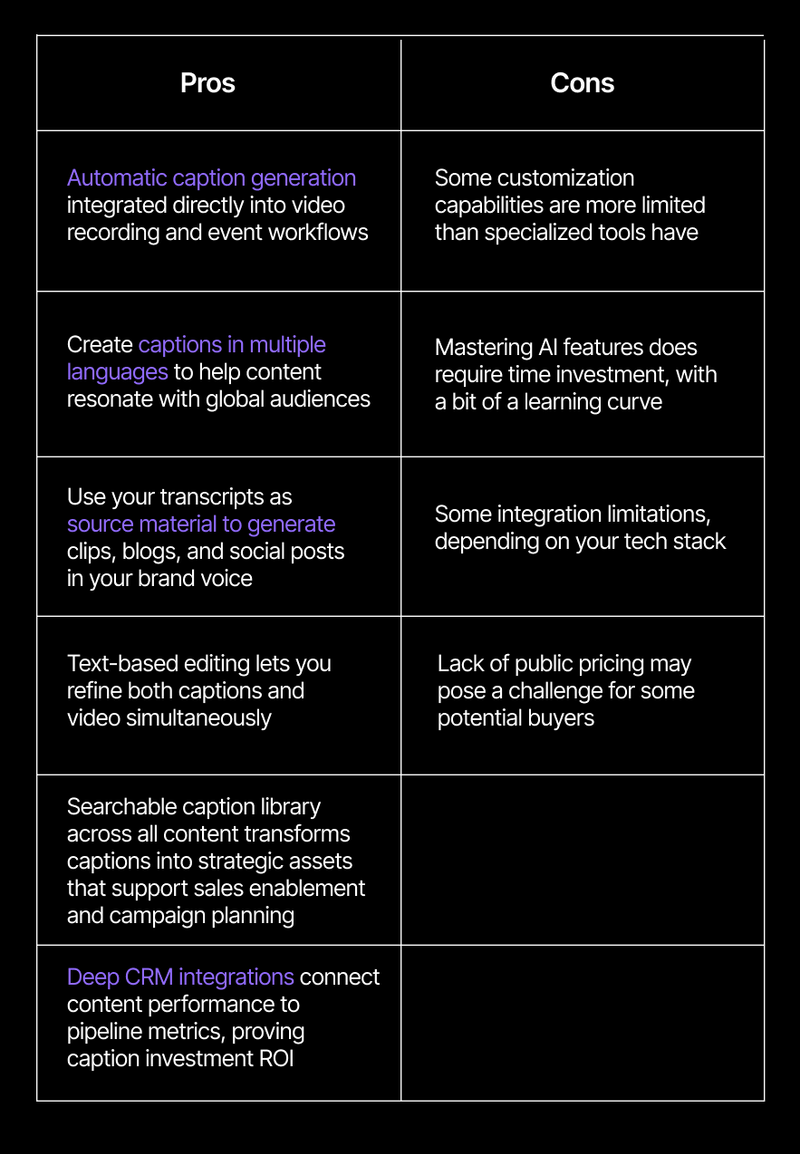
Pros and cons
Who it's ideal for
Goldcast suits B2B marketing teams who produce regular video content and view captions as strategic assets rather than post-production tasks. The platform fits organizations that need automatic caption generation integrated with content repurposing, where transcripts become the foundation for multi-channel campaigns. Ideal users measure success by content ROI and pipeline impact, not just caption accuracy metrics, and need tools to connect directly to their marketing automation and CRM systems for performance tracking.
Pricing
Goldcast offers solution-specific pricing tailored to organizational needs. Content Lab includes a forever-free version with access to AI-powered content repurposing features. Request a demo to explore pricing options for Recording Studio, Events, or custom solution bundles.
Turn Captions Into a Content Engine
See how Goldcast automatically generates captions, then uses them to create clips, blogs, and social posts — all in your brand voice.
Descript
Descript revolutionized video editing by treating transcripts as the primary editing surface, and its caption generation capabilities follow the same philosophy. The platform automatically transcribes video content into text, then lets you edit both the video and captions by manipulating the transcript. Delete a word, and both the video and captions update instantly. This text-based approach makes caption editing accessible to non-technical team members while maintaining professional quality standards.
Best for: Content creators and marketing teams who prefer intuitive, text-based workflows and want AI assistance throughout the editing and captioning process
Pricing: Free plan includes 1 media hour; paid plans start at $16/month
Veed.io
Veed.io provides browser-based caption generation that works entirely online, eliminating software downloads. The platform automatically generates captions in 125+ languages and then provides customization options for fonts, colors, and positioning. Its strength lies in speed and accessibility: Upload a video, generate captions, customize the appearance, and export, all within minutes. The browser-based approach means you can work from any device with internet access.
Best for: Marketing teams and social media managers creating captioned content across multiple platforms without extensive editing requirements
Pricing: Free plan includes limited subtitle minutes with watermark; paid plans start at $12/month
Kapwing
Kapwing combines caption generation with collaborative video editing in a browser-based platform that emphasizes team workflows. The platform supports over 70 languages for translation and includes caption animation options that help content stand out on social platforms. Its collaborative features make it particularly valuable for distributed teams working on video content together.
Best for: Content teams and agencies managing multiple client projects who need collaborative caption editing and real-time feedback workflows
Pricing: Free plan available with watermarks; paid plan starts at $16/month
Zubtitle
Zubtitle takes a streamlined approach to social video optimization, focusing on speed and simplicity. Videos can be resized for different platforms with a few clicks, and the AI generates titles, descriptions, and hashtags alongside captions. This focused approach makes Zubtitle particularly efficient for content creators who need to prepare videos for social posting quickly without extensive editing.
Best for: Social media managers and content creators who need fast, simple caption generation focused on preparing videos for social platforms
Pricing: Free plan includes 2 videos monthly; paid plans start at $19/month,
Subly
Subly positions itself as an accessibility-focused platform that emphasizes compliance alongside caption generation. The platform automatically generates captions in 100+ languages while checking for WCAG, ADA, Section 508, and European Accessibility Act compliance. Beyond basic captions, Subly creates audio descriptions, descriptive transcripts, and accessibility reports.
Best for: Enterprises and organizations requiring accessibility compliance across video libraries, particularly in regulated industries
Pricing: Pricing not publicly listed; contact sales for custom quotes
FlexClip
FlexClip operates as a browser-based video editor that includes AI-powered caption generation among its broader feature set. The platform automatically transcribes and adds subtitles in 140+ languages, then provides editing tools for trimming, transitions, and basic enhancements alongside caption formatting. Its template-based approach to video creation makes it accessible for users without editing experience, though this simplicity means caption customization options remain more limited than specialized subtitle tools.
Best for: Non-technical content creators who want basic caption generation combined with simple video editing in one browser-based tool
Pricing: Free plan with watermark; paid plans start at $19.99/month
Riverside
Riverside focuses on remote recording and podcast production, with automatic transcription and captioning built into the workflow. The platform records locally in 4K quality regardless of internet stability, then automatically generates transcripts and captions across 100+ languages. Its text-based editor lets users edit both video and captions by editing the transcript. This integrated approach benefits podcasters and remote interview creators who want captioning handled alongside their primary production workflow.
Best for: Podcasters and remote content creators who want high-quality recording combined with automatic caption generation in one platform
Pricing: Free plan with limited features; paid plans start at $29/month
OpusClip
OpusClip takes a different approach by combining caption generation with AI-powered clip creation from long-form videos. The platform analyzes long recordings to identify engaging moments, automatically creates short clips, and adds animated captions styled for social media. Captions include word-by-word highlighting and trendy text animations that match popular social content.
Best for: Content creators repurposing long-form videos into multiple short social clips with captions included automatically
Pricing: Free plan with watermark and limits; paid plans start at $15/month
How to choose the right AI caption generator
Picking the right caption and subtitle generator requires matching capabilities to your actual workflow and measuring what matters to your business beyond transcription accuracy. Here are some key considerations:
Look for a tool that connects to broader content generation. Evaluate whether the solution only generates subtitle files or helps you transform transcripts into derivative assets. The most valuable platforms don't just create accurate text; they help you repurpose that content across channels without manual intervention.
Transcription accuracy matters, but context awareness matters more. Basic accuracy metrics don't reveal how well a platform handles technical terminology, speaker identification, or industry-specific language. Test AI tools with actual recordings from your team to see which requires the least manual correction.
Brand consistency tools ensure your output looks and feels like you. Evaluate whether the solution offers customizable styling, consistent formatting templates, and the ability to apply your fonts and colors across all outputs. Generic formatting undermines professional video content.
Multi-language support becomes critical as you expand into global markets. Look beyond the baseline number of supported languages to evaluate translation quality and how easily you can manage multiple language versions of the same content.
Look for tools that connect the dots between content and pipeline. Generation time matters less than understanding what happens after captions are added. Look for solutions that provide engagement analytics showing which content drives results, not just platforms that process files quickly.
Transform your video caption workflow
The caption generator you choose determines whether captions remain a compliance checkbox or become the foundation for scaled content creation and measurable business outcomes. Traditional tools help you add accurate subtitles to finished videos. Goldcast goes further, connecting your video content to AI-powered repurposing, branded distribution, and revenue attribution that B2B marketing teams need to prove impact.
See the difference yourself! Try Content Lab free to experience how AI transforms one video into a complete content suite, where transcripts become the foundation for clips, blogs, and social posts. Or request a Recording Studio demo to see how B2B teams create professional video with automatic transcription, eliminating the disconnect between production and distribution that slows down most marketing teams. Get started below:
Turn Every Caption into Campaign Fuel
Record once in Goldcast and watch AI generate clips, blogs, and social posts – all captioned and in your brand voice.
See Recording Studio in Action
Discover how B2B teams record studio-quality videos with automatic captions, without technical complexity.
AI caption generator FAQs
What makes AI caption generators more accurate than manual transcription?
AI caption generators are trained on millions of hours of audio. They can recognize speech patterns, accents, and technical terminology more consistently than manual transcription. However, accuracy still depends on audio quality; clear recordings with minimal background noise produce the most reliable captions. Professional platforms report accuracy rates between 95-99%, though you should always review captions before publishing.
Can AI caption generators handle multiple speakers and technical terminology?
Modern caption generators include speaker identification features that separate different voices into distinct caption tracks. Technical terminology requires more attention, however. Some platforms let you create custom vocabularies for industry-specific terms, while others struggle with specialized language and require manual correction. Test any platform with your actual content before committing.
What's the difference between captions, subtitles, and closed captions?
Subtitles translate dialogue into different languages, captions transcribe audio in the same language for accessibility, and closed captions include both dialogue and important sound effects like [door closes] or [phone rings]. Most AI caption generators create captions or subtitles, but full closed captioning often requires manual additions for non-dialogue audio cues.
How do caption generators handle poor audio quality or background noise?
Caption accuracy degrades significantly with poor source audio. Background noise, overlapping speakers, and low-quality microphones all reduce transcription reliability. Some platforms include audio enhancement features that clean up recordings before generating captions, but the best approach is always to start with high-quality source material. If you regularly work with challenging audio, test platforms specifically with those conditions.
Can I customize caption appearance to match my brand?
Most caption generators offer basic customization: fonts, colors, positioning, and sizing. Enterprise platforms often provide more sophisticated branding options including custom templates, consistent intro/outro formatting, and the ability to maintain brand guidelines across all captioned content. If brand consistency matters to your organization, ensure your chosen platform supports the level of customization you require.
What file formats should I expect from caption generators?
Professional platforms export standard subtitle formats including SRT (SubRip), VTT (WebVTT), and TXT files that work across most video platforms and editing software. Some platforms also offer the ability to "burn in" captions directly to video files, creating a permanent visual overlay. Burned-in captions work universally but can't be turned off or translated, while separate caption files offer more flexibility for different distribution channels.
How do caption generators handle content repurposing and multi-channel distribution?
Basic caption generators create caption files that you manually apply to different video versions for each platform. Advanced platforms help you automatically resize, reformat, and redistribute captioned content across channels. This workflow integration saves significant time when distributing content across multiple platforms.
Transform Your Video Marketing with AI

© 2026 Copyright Goldcast, Inc. All rights reserved.
YOUR PRIVACY CHOICES