





 Upcoming Events
 Event Series
 On-Demand Events



Do you also switch between multiple tabs during your event just to see what goes live next and keep things running smoothly? We get it. Keeping speakers on and off stage at the right moment, sending polls on cue, and praying the transitions happen smoothly-it’s a lot. That’s where Live Run of Show comes in. In this playbook, we’ll walk you through how our team used the tool at our Marketer’s Got Talent event to reduce day-of stress and simplify live execution, so you’re inspired to do the same.
What You’ll Learn
- How to keep slide transitions, polls, and other event cues organized in one place
- Tips for reducing day-of stress with structured prep
Expected Results
- Reduced anxiety for organizers on event day
- Fewer production errors or missed cues
- Brings every slide, poll, video, ticker, and cue into one clear, ordered list
Step 1: Map your agenda and speaker flow
Marketer’s Got Talent was a multi-speaker event. The event featured a showdown where three marketers raced through several rounds of video editing using the Goldcast Agentic Video Editor. There were multiple engagement points and things to push live - like polls, tickers, changing slides, pushing speakers on and off stage multiple times- you name it. We started off by building the event in Goldcast and locking in our agenda. We then identified speaker transitions, slides, polls, and other things to push live or launch. Then, we drafted a ‘run of show’ doc on Notion (you can use any shared tool, like Google docs for example). We shared this doc with the speakers once done. This let everyone, including the contestants and judges, align on the timelines before we actually built the run of show into Goldcast.
💡 Pro Tip: Use this Notion/Google doc as your speaker prep tool. Share it with speakers ahead of time so they know what’s in store.
Step 2: Build your Run of Show inside Goldcast
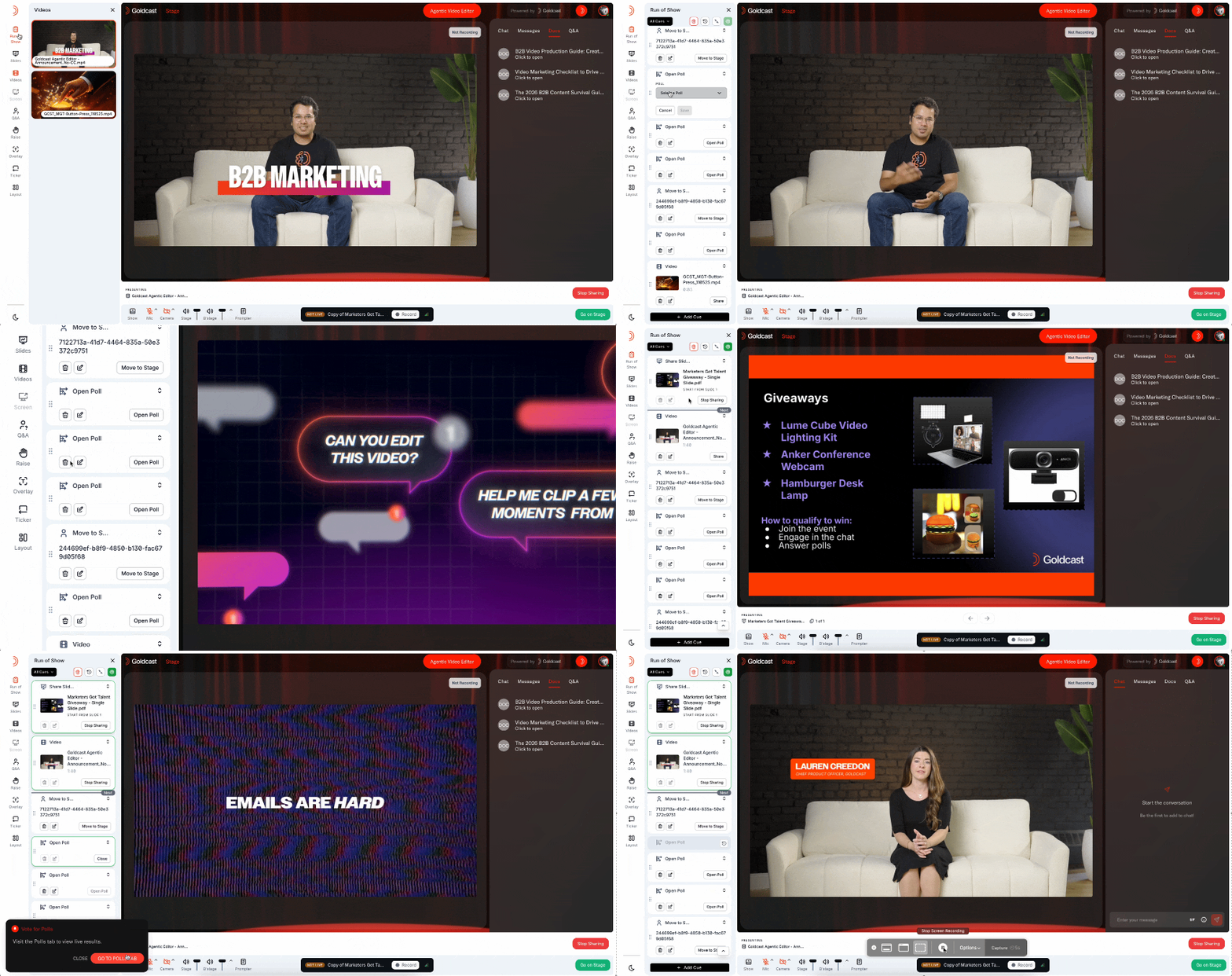
Once everyone was aligned, we transferred the sequence from the doc into Goldcast's Run of Show. You’ll be able to set up the Live Run of Show on the Assets tab on settings. Click on ‘Set up Run of Show’ and you’ll be redirected to the event where you can set up various cues.
For Marketers Got Talent, we added 15+ cues:
- Play a hype video
- Send pre-saved messages
- Move the 3 judges on stage
- Move contestant 1 on and off stage
- Launch poll 1
- Followed by moving contestant 2 and 3 on and off stage
- Launch poll 2
- Moved contestant 3 on and off
- Launch poll 3
- Move contestants on and off
- Launch the final poll
- Move all three contestant on stage
- Play another video
- Get all the judges and contestant off stage
You can see this was a lot! 😅 Because of the tight flow and speaker movement, having all cues loaded ahead of time was super essential.
Once you’ve added your cues, rest assured that everything will stay in one clean timeline you can manage during the event.
Step 3: Use it as your day-of command center
Before going live, we scheduled a short session with judges and contestants to walk through the flow using the actual Run of Show. This ensured they knew when they’ll be cued, what they'll see, and how the event will actually unfold.
🔥 Hot Tip: We highly recommend using the cues to move speakers on and off stage, it is especially helpful for nervous guests.
When the event went live, the run of show became our single source of truth. We just followed the sequence and clicked through each cue. The cues automatically get marked complete. We didn’t have to jump between slides, polls, and tabs anymore.
We had multiple speakers get on and off stage smoothly, shared videos, and slides without hassle, all thanks to Live Run of Show. The show was a hit and our attendees loved it, and Run of Show was a big reason why!
Results
For our own team, using Run of Show made a noticeable difference:
- Speakers felt more relaxed knowing exactly what to expect
- Producers avoided tab overload and execution errors. They could actually sit back and enjoy the event.
- Complex event formats (like Marketers Got Talent) ran smoothly with minimal day-of stress
- Producers could adapt in real time without breaking the flow
As Shivika, the organizer of the event, put it, "It just helps quiet all that noise. You can track where you are in the webinar without so much brain noise and anxiety. I actually sat back and enjoyed the event instead of worrying over what goes live next!"
Watch the event and see for yourself how smoothly it all played out.
Want to run a stress-free event?
Here's the help doc you can use to set up the Live Run of Show