




 Upcoming Events
 Event Series
 On-Demand Events


Repurpose Your Webinars With MCP: 4 Prompts To Turn Past Events Into Blogs, Posts and Clips
Table of Contents
Maximize Your Marketing ROI
Join 10,000 other marketers already getting the best tips on running engaging events that boost pipeline and create raving fans.
Somewhere in last quarter's webinar recording is the quote that would have made your best LinkedIn post. The problem is that nobody has the time to find it.
Alexander Bleeker, Senior Director of Brand and Content at Goldcast, describes the typical content path as: capture the event → rewatch the recording for the best moments → draft all of the content → produce the clips → distribute the content → measure performance.
In the cycle above, every step has to have a person who's responsible, plus a handoff to the next step. That means there are a lot of chances for things to fall through the cracks and explains why a lot of great content never gets repurposed.
Thankfully, with the new Goldcast MCP, it's now easier and faster than ever to repurpose your webinars. MCP lets an AI assistant like Claude work directly with your Goldcast data, and it can take on the ultra-tedious step of rewatching the recording to find the good parts.
MCP is currently in beta and works with Claude. Read on to learn our specific prompts and how to use them right away.
What MCP is, and what it does (and doesn't do) for your webinars
MCP, short for Model Context Protocol, is a standard way for an AI assistant to connect to another tool and work with its data. Normally, an assistant like Claude only knows what you share in the chat but with an MCP connection, it can go and look elsewhere.
Goldcast MCP connects Claude to your Goldcast events. You ask for what you need in plain language, and Claude uses the MCP to reach your transcripts, Q&A, chat, and Content Lab. As with any AI prompt, the more specific you are about what you need, the better AI becomes at delivering on it.
When it comes to repurposing, we all know that rewatching the recordings to find the best moments is the worst part. Now, the MCP can take that on. What it can't do, however, is capture the events themselves or measure content performance after. You'll still need other tools for that.
Brief it like a new hire: The habit that makes prompts work
When Alex writes prompts, he pretends he's briefing a new hire. In other words, are you providing enough detail that someone brand-new to the organization would understand what to do?
Take this prompt: "Summarize this webinar." Sure, you'll get something back from Claude, but it will probably be vague and generic. (AI slop, if you will.)
Now contrast that with the same ask, written differently: "Summarize this event. Give me the top 5 insights, 5 quotable lines with speaker and timestamp, the main audience question themes, and 3 clip-worthy moments. Format it as a content brief for our team."
Clearly, you'll get stronger, more spot-on results from the second prompt because it's more in-depth.
Ask these five questions as you write your prompts:
- Who is the output for?
- What format do I want?
- How long should it be?
- What voice should the tool use?
- What does "good" look like?
Remember that "good" output will still require a human in the loop. Claude's answers vary a little each session, and it can make mistakes. In our experience, Claude also flags things that only a person can settle (for example, checking a speaker's name as it appears in a transcript). Treat everything that comes back as a first draft, no matter how strong it seems at first glance.
4 prompts our content team tested to repurpose webinars with MCP
What follows are four prompts the Goldcast content team has been testing on our own events. Each one follows the same four beats:
- What we asked: the specific prompt
- What came back: Claude's output, based on that prompt
- What we'd check: what a person should do before using any of it
- What to do next: where the output goes afterward
Here are the prompts at a glance:
Prompt #1: Audience-led follow-up
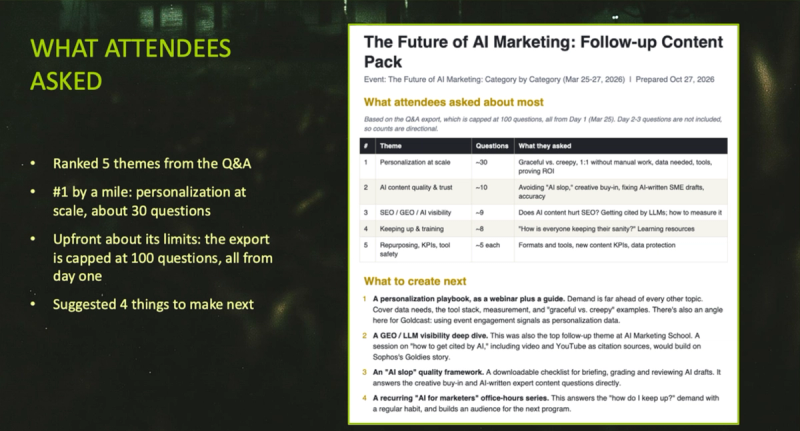
What we asked. Alex pointed Claude to Goldcast's three-day Future of AI Marketing event from March 2026 and queried what attendees asked about most. This works because Goldcast MCP can read the Q&A and the chat, not just the transcript. Here's the prompt:
What did attendees ask about most in [event]? Draft a follow-up email answering the top 2 questions, 3 LinkedIn posts, and suggest what we should create next.
What came back. Five ranked themes from the Q&A, as pictured above. Personalization at scale was the top result by a mile, followed by AI content quality and trust, and so on. Claude suggested what to create next and created the other requested deliverables.
What we'd check. The output was upfront about its limits; for example, the Q&A export capped at 100 questions, all from the first day of the event. Claude also flagged its own weak spot in the drafts, with a note to check certain figures or remove them. Be sure to go through the output carefully so that you don't miss anything!
What to do next. Alex passes the ideas back to his team for deeper research before committing to any of them. The drafted email can go into your normal follow-up process, and other content assets can follow your typical post-event distribution.
Prompt #2: The timely mining brief
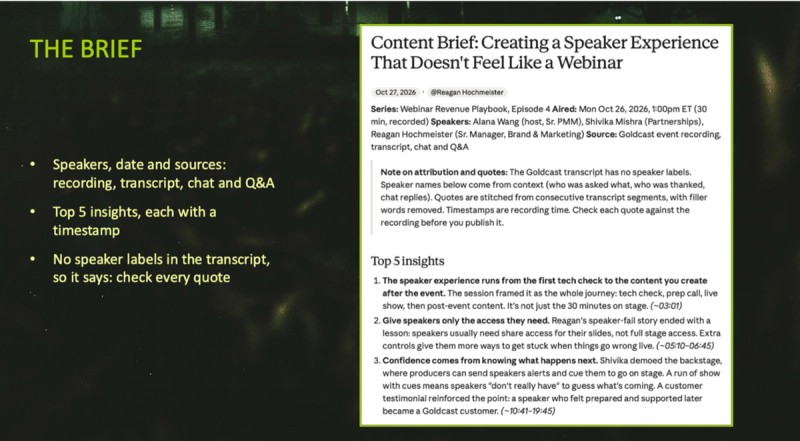
What we asked. The team ran this on an episode of its Webinar Revenue Playbook series, "Creating a Speaker Experience That Doesn't Feel Like a Webinar," which was two days old at the time. Here's the prompt:
Summarize [event]: top 5 insights, 5 quotable lines with speaker and timestamp, the main audience question themes, and 3 clip-worthy moments. Format it as a content brief for our team.
What came back. A content brief with the series, episode, air date, speakers, and sources. Then came the top five insights, each with a timestamp range so you can jump straight to it, and three clip-worthy moments with timestamps and a suggested use for each.
What we'd check. The transcript had no speaker labels. Claude worked out who said what from context, and the note at the top of the brief requested a human check against the recording before publication. This is exactly the type of honesty we need from an AI teammate!
What to do next. Hand the brief to whoever drafts and edits, and have them verify each quote and clip against the recording.
Prompt #3: The library dig
This one is for the events already sitting in your back catalogue that no one has had time to deal with.
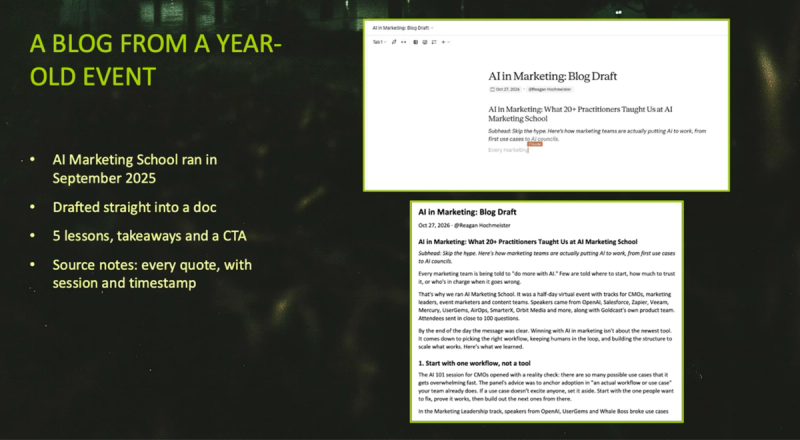
What we asked. Alex used AI Marketing School, which ran in September 2025, and asked for a blog on AI in marketing. Here's the prompt:
Check out this past event: [event] to make a blog on this topic: [topic]
What came back. A draft written straight into a document. The headline was "AI in Marketing: What 20+ Practitioners Taught Us at AI Marketing School," followed by five lessons with practical takeaways and a call to action to watch on demand. Source notes at the bottom list every quote with the session and timestamp, so the reviewer can check each one fast.
What we'd check. Verify each quote at its timestamp, and check the claims in the headline too, like how many practitioners actually spoke. Then make your own edits so that the piece sounds like you.
What to do next. Point the blog CTA to your on-demand page, which is an audience worth targeting. According to this year's B2B Webinar Benchmark Report, on-demand accounts for 15.9% of total viewership and on-demand viewers watch 91% of a recording (compared with 74% for live attendees).
Prompt #4: Timestamps for Content Lab
Video clips are one area in which AI-assisted repurposing is having a huge impact. Customers generated 365,253 clips in Content Lab in 2025, and 97.8% of them were AI-generated.
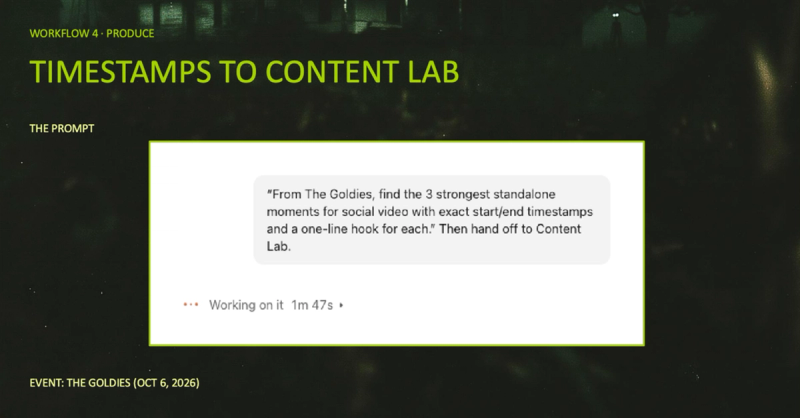
What we asked. For The Goldies, Goldcast's customer awards show from October 2026, Alex asked Claude to find the strongest standalone moments for social video and pass them off to Content Lab. Here's the prompt:
From [event], find the 3 strongest standalone moments for social video with exact start/end timestamps and a one-line hook for each. Then hand off to Content Lab.
What came back. Three timestamps to clip, start and end, each with a title, and a hook featuring Wrike, Great Place to Work, and Sophos.
What we'd check. Claude noted that each end time is a few seconds past the last line it could find. That's because the transcript only gives start times, so Claude told the team to watch each clip and tighten the ending before posting. It also flagged a stumble to cut.
What to do next. Think of this prompt as a handoff. Goldcast MCP finds the moments, times them, and explains why each one is worth a clip. Content Lab is where the video gets produced and edited, since it turns your video library into clips, blogs, social posts, and more. Finally, a person tightens each ending.
Turn Your Video Library into Content Gold
Content Lab turns your video library into clips, blogs, social posts, and more.
Try the prompts with Goldcast MCP
Remember: the MCP can't track how repurposed deliverables perform, so you'll still have to use your platform's analytics for that piece. At Goldcast, we are planning a shift in what we track, looking at things like how much time elapses between the end of an event to a first draft and how many older events the team's been able to reuse.
If you want to get started with MCP, this is the perfect time. Goldcast MCP is in beta and works with Claude today. Steal the prompts above and make them your own!
Discover Goldcast MCP
Let AI find the best moments in your past webinars and hand them to Content Lab, with you having final signoff on what goes out.
Repurpose webinars with MCP FAQs
How do you repurpose a webinar with AI?
Start with the event's data, like the transcript, Q&A, and chat, and give an AI assistant a specific prompt on what you want back. Then check everything against the recording before it goes out.
With Goldcast MCP, Claude is able to read event data in Goldcast, find the best event moments, draft posts and blogs, and hand clip timestamps to Content Lab, with your team reviewing each draft.
What can Goldcast MCP read from an event?
MCP can read your transcripts, Q&A, and chat. It works with Claude and is in beta now, so what's available will continue to expand! Bookmark the Goldcast MCP page to stay up to date on the latest capabilities.
Does MCP edit the video for you?
As of right now, no. Goldcast MCP finds and times the moment, and Content Lab does the editing.
How specific should your prompt be?
The more specific, the better. Treat prompt creation like you're working with a new hire. Be sure to include information like who the output is for, the format, the length, the voice, and what "good" looks like. Specific prompts get you more useful results and help you to stand out from the pack.
How do you check AI-drafted content before it goes out?
Validate every quote and speaker name against the recording, and double-check each source timestamp. You should also skim over everything and add your own edits as necessary. With Goldcast MCP, Claude flags several of these checks itself, which is a good habit to look for in any tool you use.
Transform Your Video Marketing with AI

© 2026 Copyright Goldcast, Inc. All rights reserved.
YOUR PRIVACY CHOICES